MX Brio 705
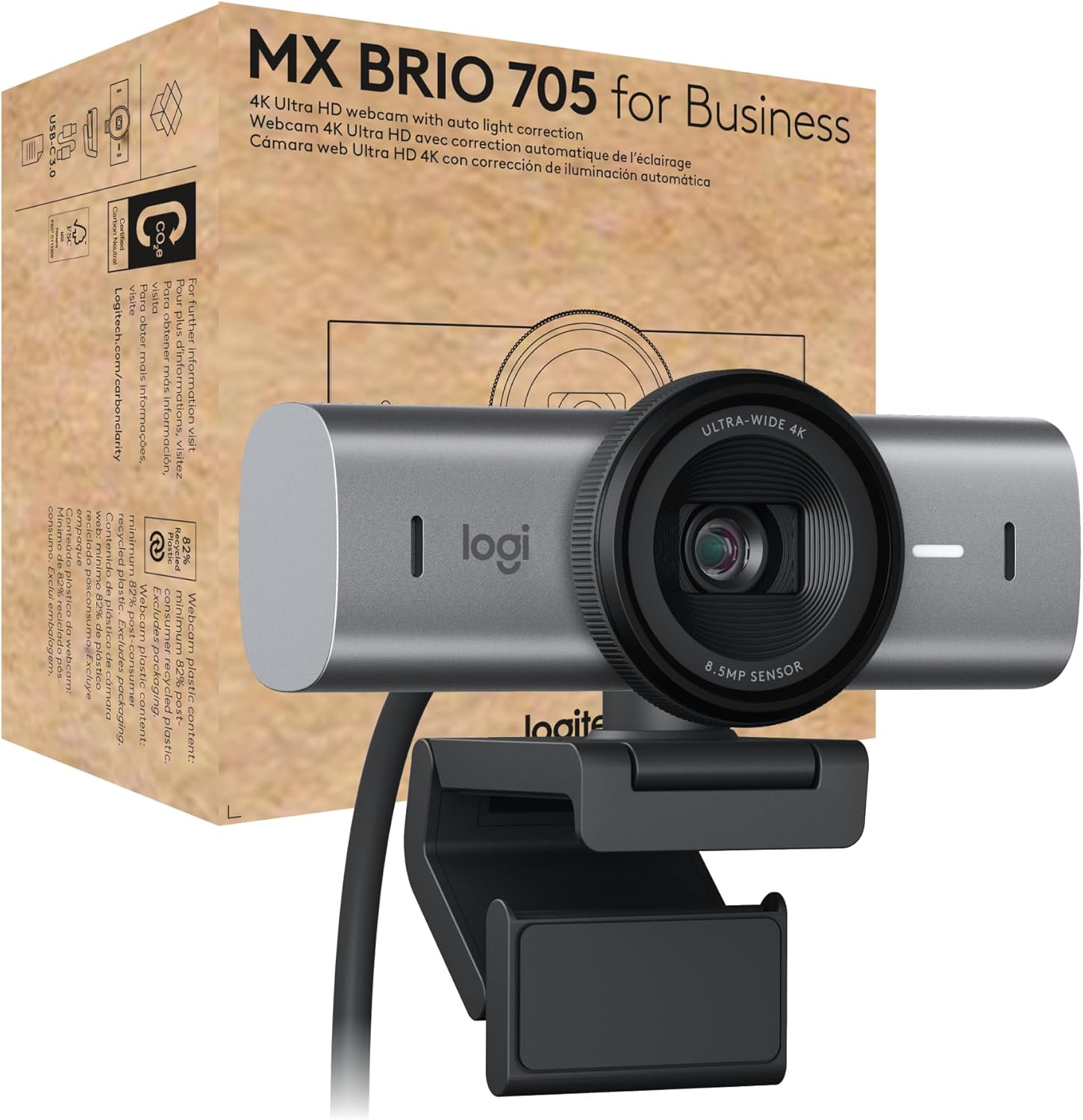
The Logitech MX Brio 705 earns its #1 ranking by doing everything well and nothing poorly — a combination that is harder to achieve than it sounds in a category where most webcams make trade-offs between image quality, audio, and feature completeness. The 4K sensor with RightLight 4 HDR handles variable home office lighting without user intervention; Show Mode AI framing keeps you centered automatically; the dual omnidirectional microphones with beamforming noise cancellation deliver clean audio without a separate mic; and a built-in privacy shutter rounds out a package that is genuinely ready for daily professional use. It is not inexpensive — but it is the most complete single-device solution in our evaluation.
How We Scored It
Category Deep-Dives
Image Quality
9.5 / 10 30% weightingThe MX Brio 705 uses a 1/1.5″ Sony STARVIS sensor — the second-largest sensor in this evaluation and one that consistently distinguishes itself in real-world home office conditions. The STARVIS sensor family is purpose-built for low-light capture, using back-illuminated (BSI) pixel architecture that increases photon collection efficiency without requiring a larger physical footprint. The practical result is that the MX Brio 705 maintains clean, noise-free video in the challenging mixed-lighting conditions common in home offices: windows behind you, overhead lights of varying quality, evening ambient light from lamps rather than overheads.
RightLight 4 with HDR is Logitech’s fourth generation of automatic light correction, and it represents a meaningful step forward from the RightLight 3 system in the older Brio 4K. Where earlier implementations would wash out bright backgrounds or underexpose your face to compensate for backlighting, RightLight 4 employs HDR processing to simultaneously expose correctly for both the background and the foreground subject. The effect is most visible in window-backlit scenarios — a situation many home office workers face when seated with daylight behind them — where the MX Brio 705 produces a far more natural, balanced image than competitors at this price point. At 4K/30fps or 1080p/60fps, resolution headroom is sufficient for any standard video call platform and any software-side framing or cropping.
Autofocus is continuous with closed-loop tracking — a system that monitors and corrects focus in real time rather than hunting reactively. In practice, this means the camera holds sharp focus on your face even with subtle movement and recovers quickly from larger positional changes. The adjustable field of view (65–90° diagonal) is software-controlled via Logi Options+ and applies globally across all applications without requiring per-app configuration. The combination of sensor quality, light correction, and autofocus makes this the most competent imaging package in our evaluation for the broadest range of home office environments.
Bottom line on image quality: The 1/1.5″ Sony STARVIS sensor with RightLight 4 HDR is the best all-conditions imaging system at this price. It handles variable lighting automatically and produces clean, sharp 4K output across a wide range of desk environments without manual intervention.
Audio Performance
9.0 / 10 25% weightingThe MX Brio 705 includes dual omnidirectional microphones with Logitech’s AI-driven noise cancellation, a combination that consistently sets the standard for what integrated webcam audio can achieve. The dual-element design allows the microphone system to apply beamforming processing — using the spatial relationship between the two microphones to electronically focus the pickup pattern toward your voice and suppress sounds arriving from other directions. In a home office, this suppresses typical background noise sources (HVAC, keyboard, street traffic, family members at a distance) without requiring a headset or dedicated desk microphone.
Logitech’s noise cancellation in the MX Brio 705 is notably well-tuned compared to previous generations. AI-based implementations can occasionally over-process, producing a slightly robotic or clipped quality to the speaker’s voice — a common complaint with early-generation noise cancellation systems. The MX Brio 705’s system avoids this by applying more conservative suppression thresholds that reduce background noise substantially while preserving the natural character of your voice. The result is call audio that sounds genuinely clean to your interlocutors without the processed artifacts that signal heavy-handed noise reduction.
For home office users relying solely on a webcam for audio — without a separate microphone or headset — the MX Brio 705 is the strongest integrated solution in our evaluation. Users who already own a dedicated condenser or dynamic microphone will find the audio category less relevant to their decision, but for everyone else, the MX Brio 705’s microphone system is a genuine differentiator over the alternatives at this price point.
Bottom line on audio performance: The best integrated microphone system in our webcam evaluation. The dual-element beamforming with AI noise cancellation delivers genuinely clean call audio without a separate microphone — a practical advantage for the majority of home office users.
Usability & Features
9.5 / 10 20% weightingShow Mode is the MX Brio 705’s standout feature and a genuinely useful addition for home office presentations and whiteboarding sessions. When activated, Show Mode automatically shifts from face-framing mode to a downward-angled view, allowing you to present physical documents, sketches, or products directly to your camera without repositioning it. The transition is smooth and manually toggled, so it does not interfere with standard call usage. This is a feature that sounds like a marketing gimmick on paper but proves practically useful in the small number of situations where you want to show physical items on a call — once you have it, the alternative of picking up the camera and pointing it manually feels noticeably crude.
Beyond Show Mode, the Logi Options+ software provides comprehensive camera control: FOV adjustment (65–90° adjustable in software), manual overrides for white balance and exposure, AI framing behavior customization, and Show Mode configuration. The software is available for Windows and macOS, is genuinely stable and well-designed, and integrates with the broader Logi Options+ ecosystem for Logitech keyboards, mice, and other peripherals. Platform certification is extensive — the MX Brio 705 carries Microsoft Teams, Zoom, and Google Meet certifications, meaning Logitech has tested and validated the camera’s performance in each major conference platform. For organizations standardizing on any of these platforms, certification reduces deployment friction.
Plug-and-play operation is reliable: connect via USB-C and the camera functions immediately on all supported platforms without driver installation. Logi Options+ is optional enhancement rather than a requirement for basic function. The USB-C connection adds a degree of future-proofing relative to USB-A alternatives, and the cable is long enough for most desk configurations at 1.5 meters. The included clip mount and desk stand give the MX Brio 705 flexibility across monitor configurations — top-of-monitor clip, desk stand, or tripod mount via the standard ¼-20 thread.
Bottom line on usability and features: Show Mode is a genuinely useful differentiator; Logi Options+ is one of the best companion apps in the category; platform certifications cover the full set of enterprise video conferencing tools. The highest usability score in our evaluation.
Value
8.5 / 10 15% weightingThe MX Brio 705 sits at the top of the premium webcam tier alongside the Razer Kiyo Pro Ultra. It is priced similarly to other flagship-tier webcams, including the Dell UltraSharp WB7022 — though those products differ sharply in what they include, with the WB7022, for example, shipping without any microphone. The value distinction among these products is driven entirely by what each includes and who it best serves, not by price alone. The MX Brio 705’s value case is strong because it delivers a complete solution: 4K sensor, integrated beamforming microphones, AI framing, privacy shutter, and mature companion software in a single device. For users who would otherwise need to purchase a separate webcam and a separate microphone, the MX Brio 705 consolidates that spend efficiently.
The 8.5 value score — strong but not exceptional — reflects an honest assessment: you are paying a meaningful premium over capable mid-range webcams like the Obsbot Meet 2 and the Insta360 Link 2C. The premium buys you the larger Sony STARVIS sensor, RightLight 4 HDR, Show Mode, and a more polished software experience. For professional users who spend multiple hours daily on video calls and cannot afford to manage poor audio or inconsistent image quality, the incremental investment over mid-range alternatives is well-justified. For users with less demanding call schedules or who already own a dedicated microphone, the value calculus is narrower.
Bottom line on value: Strong value among premium webcams because it includes a complete audio solution alongside best-in-class optics. The premium over mid-range alternatives is justified for users making full-time professional use of their webcam setup. Less defensible for light users or those with existing audio equipment.
Physical Design
9.5 / 10 10% weightingThe MX Brio 705 is compact and well-finished for its sensor size, following Logitech’s established design language for the MX line: matte plastic with a restrained aesthetic that fits professional desk environments without drawing attention. The built-in privacy shutter is a sliding integrated mechanism — the most reliable form of physical privacy protection — that blocks the lens completely when closed. This is a practical consideration for home office workers whose cameras sit on monitors in shared spaces or living areas where privacy during non-call hours is desirable.
The universal clip mount accommodates monitor bezels from 1mm to approximately 30mm in depth, covering the vast majority of modern monitors including thin-bezel designs. The included desk stand provides a stable alternative for users who prefer the camera positioned below eye level or who use laptop setups without a monitor. The standard ¼-20 thread allows tripod or arm mounting for users who need more positional flexibility. The USB-C cable is 1.5 meters — adequate for most single-monitor desk configurations. The camera’s small footprint (approximately 95mm wide) means it does not visually dominate the top of most monitors. Build quality is solid for the price: no perceivable flex, a smooth rotation mechanism for angle adjustment, and a clip mechanism that holds its position reliably without gripping the monitor too tightly.
Bottom line on physical design: An integrated privacy shutter, a well-designed universal clip, included desk stand, and ¼-20 thread mounting combine to give the MX Brio 705 the highest physical design score in our evaluation. Small footprint and clean finish are practical advantages in a professional desk environment.
About the Manufacturer
tech
Logitech was founded in 1981 in Apples, Switzerland, initially producing computer mice for the OEM market before establishing its own consumer brand. The company grew into the world’s largest PC peripheral maker, with a product portfolio spanning mice, keyboards, webcams, headsets, speakers, and gaming accessories. Logitech is publicly traded on both the SIX Swiss Exchange and Nasdaq, and generates over $4 billion in annual revenue.
Logitech entered the webcam category early and has maintained category leadership through multiple generational cycles. The MX (Master) product line represents Logitech’s premium consumer and prosumer tier, distinguished by higher-quality sensors, more advanced software features, and more premium materials than the standard product range. The MX Brio 705 is the current flagship of Logitech’s webcam lineup, succeeding the Brio 4K with a larger Sony STARVIS sensor, fourth-generation RightLight, AI-powered Show Mode, and USB-C connectivity.
Logitech’s Logi Options+ software platform is one of the most mature peripheral management applications in the category, providing cross-device customization for Logitech mice, keyboards, and webcams from a single unified interface. Webcam configuration, including FOV adjustment, noise cancellation settings, and Show Mode behavior, is managed through Logi Options+ on both Windows and macOS. Logitech webcams are sold through Logitech’s own retail channels, major electronics retailers, and on Amazon with direct Logitech fulfillment.