SD5910T DisplayLink Thunderbolt 4 Dock
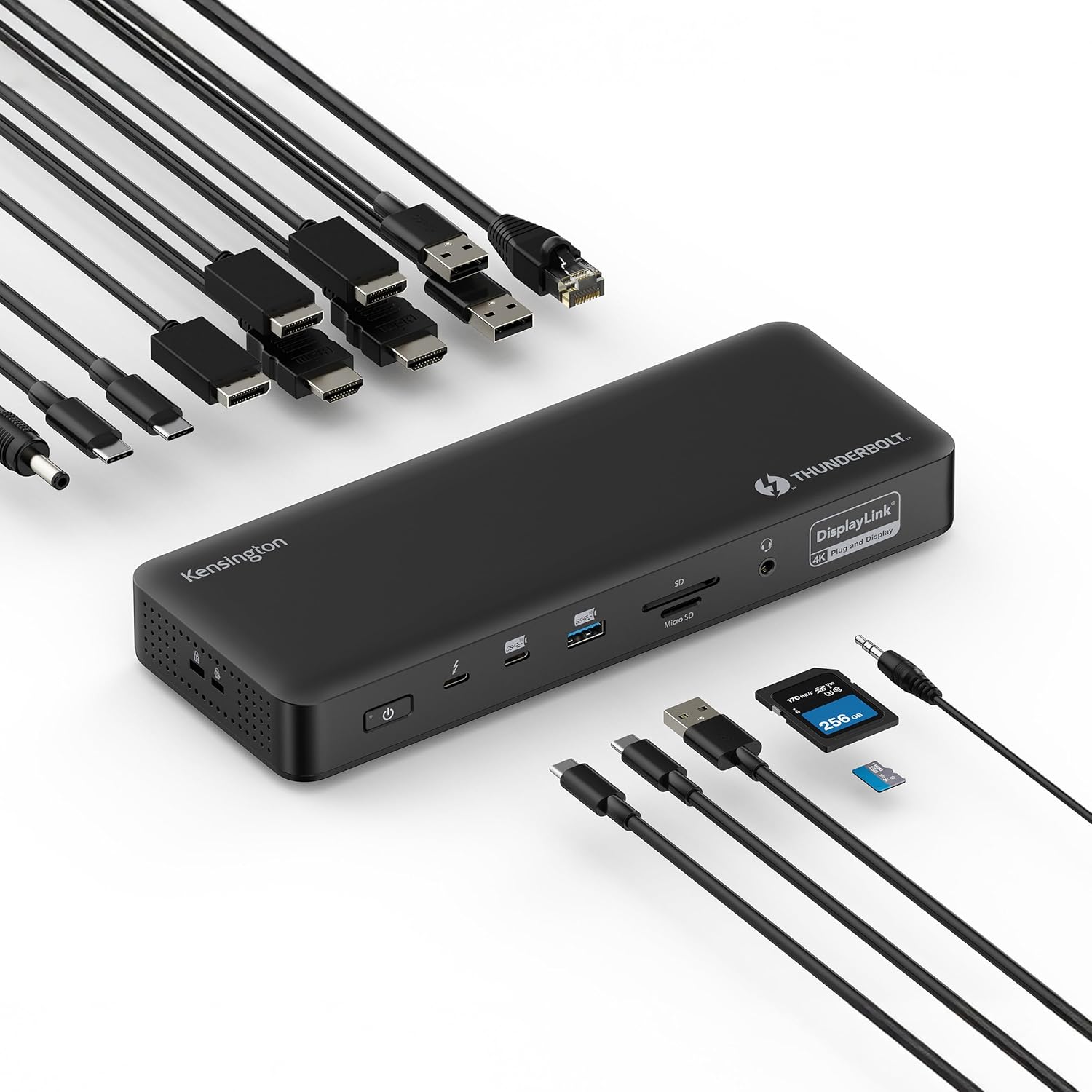
The Kensington SD5910T occupies a genuinely unique position in our guide: it is the only dock that combines a Thunderbolt 4 host connection with DisplayLink video output, enabling up to four external 4K@60Hz displays while maintaining full 40Gbps TB4 data bandwidth for storage and peripherals. This hybrid architecture is the right solution for a narrow but real use case — users with Thunderbolt 4 laptops who need more than two external monitors. The tradeoffs are honest and significant: DisplayLink requires driver installation, adds CPU overhead, and is incompatible with HDCP-protected content on macOS. For users who don’t need four displays, Kensington’s own SD5700T delivers a cleaner, driverless experience at a lower rank.
How We Scored It
Category Deep-Dives
Connectivity & Bandwidth
7.0 / 10 30% weightingThe SD5910T’s host connection is Thunderbolt 4 at full 40Gbps — the same connection standard as the CalDigit TS4 and Kensington’s own SD5700T. This is a meaningful advantage over USB-C Alt Mode docks in the guide: the full 40Gbps bandwidth is available for high-speed storage, downstream Thunderbolt accessories, and data transfer alongside simultaneous power delivery. Connect a Thunderbolt NVMe SSD and you get the full performance the drive can deliver; on a 10Gbps USB-C dock, bandwidth is shared and constrained.
The connectivity score sits at 7.0 rather than the 8–9 range typical of pure TB4 docks because of a fundamental architectural distinction: all video output on the SD5910T is handled by DisplayLink, not by the laptop’s native GPU via Thunderbolt. This matters for the connectivity category because the dock’s video rendering path imposes a software dependency (the DisplayLink driver must be installed and running), adds CPU processing overhead, and creates an incompatibility with HDCP-protected content on macOS — limitations that do not exist on native Thunderbolt display output. The 40Gbps data pipeline is genuinely available and genuinely useful; the display path carries real constraints that affect how the dock functions in practice.
For users who primarily care about data transfer performance — accessing a NAS over Thunderbolt, running a Thunderbolt storage array, daisy-chaining Thunderbolt accessories — the SD5910T’s host connection delivers. For users who choose this dock primarily for its 4-display capability, the Thunderbolt connection provides the platform for that capability while DisplayLink provides the actual video rendering, and the combination is the dock’s reason for existing.
Bottom line on connectivity: The TB4 host connection provides full 40Gbps data bandwidth — a genuine advantage over USB-C docks. The 7.0 score reflects that DisplayLink handles all display output, adding driver dependency and CPU overhead that pure TB4 docks avoid. The data pipeline is strong; the display pipeline is constrained by design.
Display Capability
7.5 / 10 25% weightingThe SD5910T’s most compelling specification is its ability to drive up to four external displays at 4K@60Hz simultaneously via DisplayLink. In our guide, only the Anker 778 TB4 dock matches this display count — and the Anker achieves it differently, routing video through the laptop’s native GPU via Thunderbolt rather than DisplayLink. The practical result for the SD5910T is that four-display capability extends to laptops that cannot otherwise support it natively: an M2 MacBook Air with its single-external-display GPU limitation can run four monitors through this dock’s DisplayLink rendering path in a way that no pure Thunderbolt dock can enable.
The 7.5 display score reflects genuine capability alongside real constraints. DisplayLink’s rendering approach differs from native GPU output in several important ways. HDCP-protected content — streaming services, DRM-protected video — may not play correctly on DisplayLink-connected monitors on macOS due to the way the DisplayLink driver processes display data. GPU-accelerated applications, including video editing software and hardware-accelerated rendering tasks, will perform worse on a DisplayLink-connected monitor than on a native output because DisplayLink routes display content through the CPU rather than directly from the GPU. macOS requires Screen Recording permission to be granted to the DisplayLink Manager application before any display output functions — a system security requirement, not a DisplayLink limitation, but one that catches first-time users unprepared.
For the primary use case — four monitors running productivity applications, browser tabs, communication tools, and documents — DisplayLink at 4K@60Hz is visually indistinguishable from native output. Motion is smooth, text is sharp, and the four-monitor configuration works reliably once the driver is installed. The limitations matter for specific workflows; for general office productivity across four screens, they do not.
Bottom line on display capability: Four 4K@60Hz displays via DisplayLink is a capability that no pure Thunderbolt dock in our guide can match. The constraints — driver required, HDCP limitations on macOS, CPU overhead for rendering — are real and should be understood before purchase. For office productivity workflows across four monitors, the SD5910T delivers what it promises.
Power Delivery
8.5 / 10 20% weightingThe SD5910T provides 100W of Power Delivery to the connected host laptop, which is the highest standard in the consumer docking station market and is sufficient for virtually any laptop — from a 13-inch MacBook Air requiring 30–45W to a 16-inch MacBook Pro or high-performance Windows laptop requiring up to 96W. With 100W available, users running demanding laptops can connect a single Thunderbolt cable, receive full charging capability, and have all four displays active simultaneously without managing a separate power adapter.
The 8.5 score rather than the maximum reflects a practical consideration: when all four DisplayLink displays are active and processing video simultaneously, the combined system load — GPU rendering, CPU overhead from DisplayLink, and peripheral power draw — can result in effective PD delivery to the laptop being somewhat lower than the rated 100W peak. This is not unique to the SD5910T; most premium docks face similar constraints under maximum combined load. In typical four-display productivity use at moderate system load, the full PD rate is sustained. Users running intensive workloads across four monitors simultaneously while charging a power-hungry laptop may observe slightly lower charging rates under peak conditions.
The SD5910T includes a 180W power supply, which provides meaningful headroom over the 100W laptop PD allocation for simultaneous downstream device charging and peripheral power. Kensington does not publish the individual downstream charging port wattages with the same transparency as CalDigit, which is a minor documentation gap but not a functional limitation for typical home office use.
Bottom line on power delivery: 100W PD is best-in-class and covers every laptop in practical home office use. The 8.5 reflects the real-world nuance that simultaneous four-display DisplayLink operation and heavy workloads can reduce effective peak PD delivery — a documented characteristic of maximum-load scenarios rather than a fundamental design weakness.
Port Mix & Usability
6.0 / 10 15% weightingThe SD5910T’s port selection is functional but not exceptional relative to its price tier. The four USB-A ports handle keyboards, mice, storage, and accessories; two USB-C data ports accommodate modern peripherals and accessories that require USB-C connectivity. An SD card reader supports photographers and content creators who transfer media directly. A 3.5mm combination audio jack handles headphones or a headset. Kensington’s Lock slot — present on all Kensington docks — provides physical security tethering for shared spaces or corporate environments, a genuinely useful feature that no other dock brand includes as consistently.
The Ethernet port provides standard Gigabit (1GbE), which is adequate for home office use but represents a step back from the 2.5GbE available on the CalDigit TS4. For most home internet connections and productivity applications, 1GbE is sufficient; users with 2.5GbE NAS devices or multi-gigabit routers will notice the limitation. The 6.0 port mix score reflects a dock that covers the basics competently without the higher USB-A port count (the CalDigit TS4 provides five), the 2.5GbE, or the front-panel UHS-II card reader that justify higher port scores on category leaders.
Port placement is practical: display outputs, Ethernet, and power occupy the rear, while USB-A and audio ports include front access for convenient connection of peripherals that are attached and removed frequently. This front/rear separation follows good design practice and reduces desktop clutter for semi-permanent connections.
Bottom line on port mix: The SD5910T covers the essentials for a home office setup competently. Four USB-A, two USB-C, SD reader, audio, and 1GbE Ethernet meet standard needs. The 6.0 score reflects adequate but not exceptional port count, 1GbE rather than 2.5GbE, and documentation that is less detailed than category leaders on individual port specifications.
Value
5.5 / 10 7% weightingThe SD5910T is priced as a premium dock — above the Plugable UD-6950PDH (the other DisplayLink dock in our guide) and competitive with the CalDigit TS4. The value proposition is real but narrow: it delivers the combination of full TB4 data bandwidth and four-display capability that no other dock in this guide provides. For the specific user who needs both — a Thunderbolt 4 laptop, high-speed external storage or daisy-chaining needs, and a four-monitor setup — the SD5910T fills a gap that simpler alternatives cannot.
For users who need four displays but not TB4 data speeds, the Plugable UD-6950PDH achieves dual 4K via DisplayLink on a USB-C connection at a lower price point. For users who need TB4 but only two displays, the Kensington SD5700T or CalDigit TS4 are meaningfully cleaner options without the DisplayLink overhead. The SD5910T’s value case depends entirely on needing both simultaneously — and for that intersection of requirements, it earns its position.
Kensington’s three-year warranty is above the industry norm of 18–24 months and is a genuine value component at its price tier. It covers the dock’s full useful life through a typical enterprise equipment cycle and provides meaningful long-term protection for what is an infrastructure investment.
Bottom line on value: The 5.5 score reflects a premium price for a specialized product. The value equation is sound only for users who specifically need TB4 data bandwidth and more than two external displays simultaneously — a real but narrow use case. Outside that intersection, comparably priced docks offer more appropriate feature sets.
Build & Design
7.5 / 10 3% weightingThe SD5910T is built to Kensington’s established enterprise standard: an aluminum chassis provides better passive heat dissipation than plastic-bodied alternatives, which matters for a device that processes significant data and display workloads continuously. Kensington’s construction quality has a strong track record in commercial deployments where docks run for extended hours without restart — the SD5910T benefits from the same material choices and manufacturing standards that have made Kensington’s TB4 lineup reliable in enterprise environments.
The physical design is conservative and workspace-appropriate — the SD5910T sits on the desk in a compact horizontal form factor without the visual statement of some consumer-oriented docks. The Kensington Security Slot on the rear allows a cable lock to physically tether the dock, a feature unique to Kensington among the brands in our guide and genuinely useful in shared or high-traffic environments.
Bottom line on build and design: Aluminum construction and Kensington’s enterprise build standards provide a physically reliable foundation for a device under heavy continuous use. The security lock slot is a meaningful differentiator. The 7.5 reflects solid but not exceptional physical design — functional and durable without the aesthetic distinctiveness of some category competitors.
About the Manufacturer
sing
ton
Kensington is a workspace products company with origins in physical security accessories — the Kensington Security Slot standard it created is now the universal lock mechanism present on virtually every laptop and many docking stations. Founded in 1981 and now a division of ACCO Brands, Kensington has built a professional peripherals product line that emphasizes enterprise reliability, physical security, and long-term support infrastructure over consumer-market feature maximalism.
In the docking station category, Kensington occupies a consistent position: products built to enterprise-grade physical standards, conservatively specified relative to marketed capabilities, with three-year warranty terms that exceed the industry norm. Their TB4 lineup — including the SD5700T (our #3 docking station) and the SD5910T — reflects this philosophy: thorough specification documentation, reliable power delivery behavior under load, and an aluminum construction that prioritizes thermal management and longevity.
The SD5910T represents Kensington’s entry into the hybrid DisplayLink-over-Thunderbolt category, addressing a market gap for users who need both TB4 data bandwidth and multi-display capability beyond the two-screen limit of standard Thunderbolt docking. Kensington’s enterprise support infrastructure — three-year warranty, active firmware updates, and documented compatibility matrices — is a meaningful advantage for a product type where driver and firmware behavior directly affects daily functionality.