325 FHD
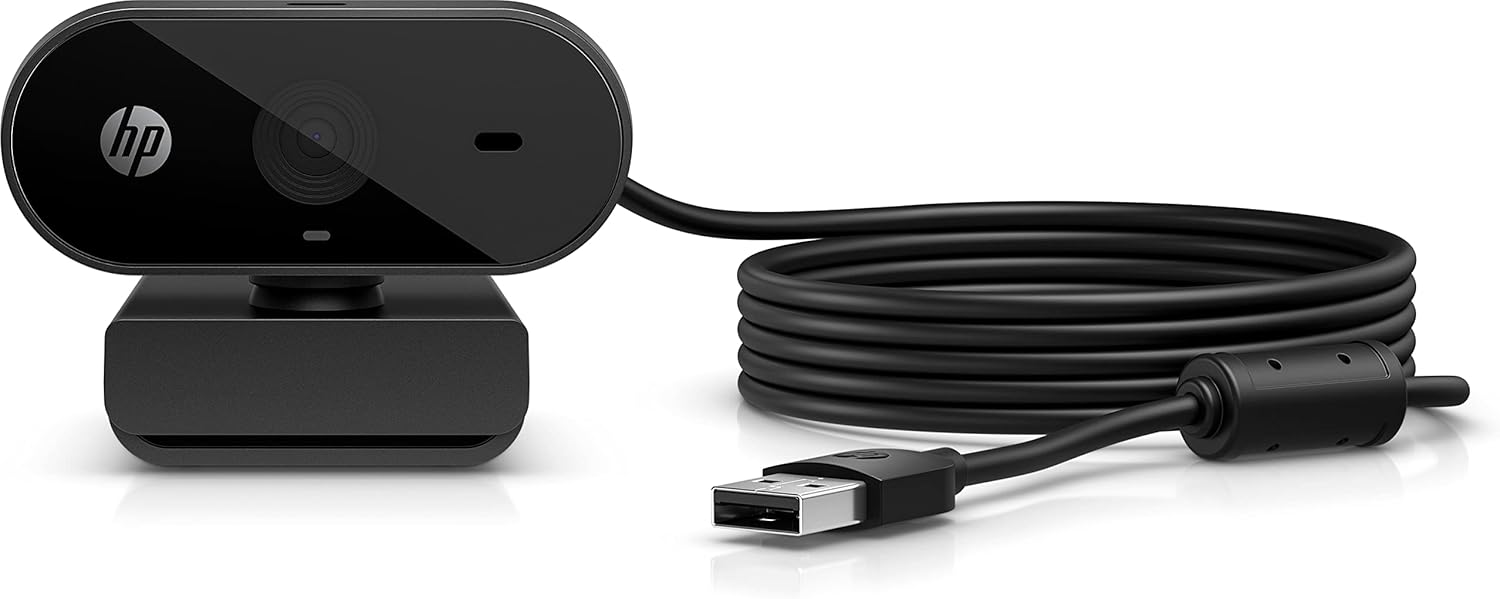
The HP 325 FHD is an entry-level 1080p webcam built for buyers whose only requirement is a functional camera at the lowest possible price. It delivers that in the narrowest sense: plug in, get a picture. In every dimension beyond bare functionality — image quality, audio, features, and value relative to the budget competition — the 325 trails what the market now offers at comparable price points. Fixed focus, a single basic microphone, no privacy shutter, no software, and no path to improved performance through settings or firmware distinguish this as a minimum-viable webcam rather than a considered purchase. It ranks last in our guide for those reasons.
How We Scored It
Category Deep-Dives
Image Quality
3.5 / 10 30% weightingThe HP 325 FHD outputs 1080p at 30fps, which is the minimum specification that qualifies as a Full HD webcam. Resolution is where the specification ends. The camera uses a fixed-focus lens, which means the focal distance is locked at manufacture to a typical seated-desk distance. Subjects within that focal range appear adequately sharp; subjects closer or farther from the camera are noticeably softer without any adjustment possible. This eliminates the 325 from any use case where the speaker is not consistently at a standard desk position.
Low-light performance is poor. The sensor lacks the light-gathering capability of larger or better-quality budget competitors, and there is no software-based brightness correction or noise reduction. In office conditions with adequate overhead lighting directly on the subject, output is functional. In mixed lighting, window backlighting, or dim conditions — the reality for most home office environments at different times of day — the 325’s output becomes noticeably grainy and washed out. Competing 1080p webcams at comparable or slightly higher prices (Logitech C920x, ranked #12; Anker PowerConf C200, ranked #10) produce measurably better image quality under real-world conditions by virtue of better lens quality, autofocus, and image processing.
Color reproduction is average at best. Skin tones in standard lighting skew slightly cool and flat, and the camera does not offer any white balance control or preset. Auto-exposure is functional but slow to react to lighting changes — walking from a dark hallway into a lit room takes several seconds to stabilize, which is disruptive for live calls.
Bottom line on image quality: Fixed focus, below-average low-light performance, slow auto-exposure, and no image controls produce a camera that meets the technical 1080p specification without delivering practical 1080p quality in typical home office conditions. The 3.5 score reflects image output at the bottom of the current 1080p market.
Audio Performance
4.0 / 10 25% weightingThe HP 325 includes a single built-in microphone. Voice pickup at close range in a quiet room is functional — call participants can hear and understand the speaker, which is the minimum bar. Beyond that minimum, the 325’s audio holds no advantages. A single omnidirectional microphone with no noise canceling, no beamforming, and no frequency tuning picks up the full ambient noise environment: HVAC systems, street noise, keyboard clicks, and background conversation are all captured and transmitted without attenuation.
The absence of noise processing is the core limitation. Webcams at comparable prices from Anker and Logitech now routinely include either software-based or hardware-based noise reduction. The 325 offers none of this, which means buyers working in anything other than a quiet, acoustically controlled room will consistently produce poor audio quality for their call participants. There is no software equalizer, no gain control, and no companion application that would allow any adjustment to audio capture behavior.
Bottom line on audio performance: Single mic, no noise processing, no controls. Functional in ideal conditions; notably poor in any realistic home office environment with background noise. The 4.0 score recognizes basic voice capture capability while reflecting the absence of any quality-improving features at a price tier where they are increasingly standard.
Usability & Features
4.0 / 10 20% weightingThe HP 325’s usability case rests entirely on plug-and-play simplicity. There is no software to install, no account to create, no driver conflicts to navigate. Plug the USB-A connector into a port, and the operating system recognizes the camera immediately. For buyers who genuinely have no interest in configuration and simply need a camera that works without setup, this is the 325’s strongest argument. It is a real convenience for technically non-confident users, IT administrators deploying to many desks, or shared workstations where software cannot be installed.
Beyond plug-and-play reliability, the feature set is empty. There is no privacy shutter — a notable absence at a time when most new webcam releases include one as standard. There is no AI auto-framing, no background blur, no zoom, no exposure lock, no white balance preset, no scene mode. There is no companion software, which means none of these features can be added. The camera does not support any streaming-platform-specific settings, and its hardware controls are limited to a status LED that indicates when the camera is active.
The absence of a privacy shutter warrants specific mention. The 325 has no physical or electronic means of blocking the camera lens other than unplugging it or covering it manually. For buyers with any concern about camera privacy — a consideration that has become mainstream for both home and professional use — the 325 requires an external lens cover or habit of unplugging. Competing webcams at the same price point now routinely include a physical shutter.
Bottom line on usability and features: Plug-and-play reliability is the single usability strength. No privacy shutter, no software, no controls, no intelligent features of any kind. The 4.0 score reflects reliable basic operation against a feature void that trails the current budget webcam market by a widening margin.
Value
4.0 / 10 15% weightingThe HP 325 FHD is priced at the floor of the new webcam market. Its value argument rests on that price: for buyers who need to spend as little as possible to have a working camera, the 325 accomplishes that at minimal cost. For any other purchase criterion, the value case weakens quickly. The Logitech C270 HD (720p) delivers comparable or better image consistency in the same price range with Logitech’s more reliable driver support. Stepping up modestly to the Anker PowerConf C200 or Logitech C920x unlocks autofocus, substantially better image quality, cleaner audio, and in some cases a privacy shutter — differences that are significant for daily professional use.
The 325’s budget price is its only competitive argument, and it does not convincingly win even there. Budget-tier buyers who stretch slightly get meaningfully better hardware. Buyers who cannot stretch at all get a camera that works, but works at the bottom of what the category currently offers. The 4.0 value score reflects a camera whose price is low but whose delivered quality per dollar trails what the current entry-level market makes available from more capable alternatives.
Bottom line on value: Lowest entry price in the guide, which is the 325’s only structural advantage. The delivered quality-per-dollar ratio is poor relative to alternatives available for a modest increment more. The 4.0 score reflects budget accessibility against thin competitive standing even on price grounds.
Physical Design
3.5 / 10 10% weightingThe HP 325 uses a basic plastic housing with a monitor clip as the sole mounting option. Build quality is consistent with the price tier: lightweight plastic with visible seam lines, a clip that grips most monitors adequately but provides no tilt adjustment beyond a single friction hinge. The physical form factor is compact and unobtrusive, which is appropriate for a camera intended to disappear from view.
The design omissions are more notable than the design choices. There is no tripod mount (no standard 1/4”-20 thread), limiting placement to monitor-top only. There is no privacy shutter of any kind. The USB-A cable is fixed and non-removable; if the cable is damaged, the camera is non-functional and non-repairable. The status LED operates independently of any user control — it illuminates whenever the camera feed is active and cannot be disabled, which creates issues for buyers who use the camera in dark environments or prefer not to have active indicators visible.
The overall physical execution is that of a camera designed to the minimum viable specification for the category. Nothing about the physical construction suggests HP invested materially in the 325’s hardware design beyond the baseline required to produce a functional product.
Bottom line on physical design: Basic plastic construction, monitor-clip only, fixed non-removable cable, no privacy shutter, no tripod thread. The 3.5 score reflects a physical design at the floor of what the category produces, with no differentiating hardware elements and several notable omissions.
About the Manufacturer
HP Inc. is one of the world’s largest personal computer and printing companies. Webcams are a secondary product line within HP’s peripheral accessory catalog, positioned to complement HP laptop and desktop purchases rather than as standalone market products. The 325 FHD represents the bottom of HP’s webcam range and reflects the company’s positioning: a functional accessory at a low price point, without the investment in image quality, audio engineering, or software development that dedicated peripheral manufacturers bring to comparable or higher-priced products.
HP’s driver support for its webcams is maintained through Windows Update and macOS system compatibility, making the plug-and-play experience generally reliable across major operating system versions. Firmware updates and feature additions through software are not part of HP’s webcam development model at this price tier. Support is handled through HP’s general consumer hardware support channels. For buyers already in an HP ecosystem who need a minimum-cost camera quickly, the 325 is a known-safe purchase; for buyers optimizing for value or performance at any budget level, the wider market offers better options at comparable prices.