PowerConf C200
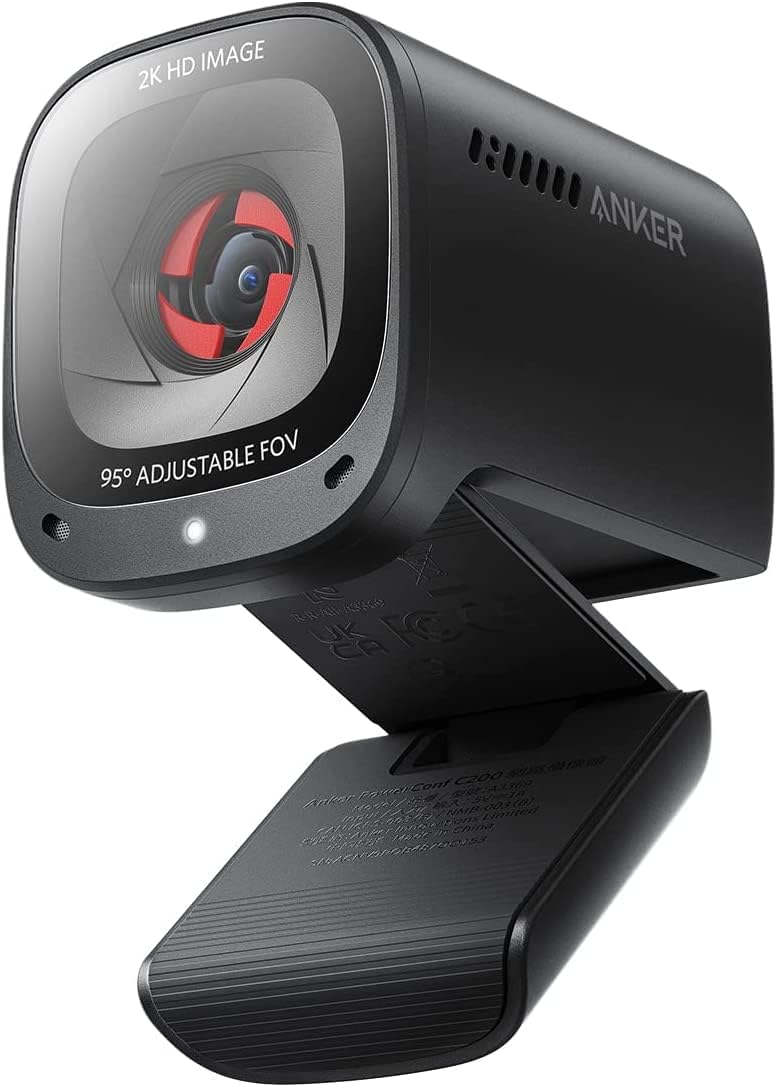
The Anker PowerConf C200 makes a specific argument in the budget webcam category: 2K resolution and an integrated privacy shutter at a budget price, in a compact package that ships as a straightforward plug-and-play device. For buyers who prioritize image resolution over frame rate — and who want a physical privacy solution that cannot be lost or forgotten at home — the C200 addresses both needs without requiring a step up to the midrange. Its sister model, the C300, makes a different trade: 1080p at 60fps, AI auto-framing, and a three-mic array, for a modest premium. The C200 vs. C300 choice is genuinely a question of priorities rather than a clear hierarchy, and both earn their positions within the guide. Where the C200 falls short is audio: the built-in microphone with AI noise canceling is functional but has a documented over-processing tendency that can produce an artificial audio character under heavy background noise. For buyers whose home office is reasonably quiet, this is a manageable limitation; for buyers in noisier environments, the C300’s three-mic array is a material upgrade.
How We Scored It
Category Deep-Dives
Image Quality
7.0 / 10 30% weightingThe C200’s primary image quality argument is its 2K (2560×1440) resolution. The step up from 1080p delivers a meaningful increase in on-screen detail — particularly relevant for users who share their screen during calls, where text, interface elements, and document content all benefit from the additional pixel count. At the same FOV and viewing distance, a 2K image produces noticeably sharper text edges and finer line detail than a 1080p output. This is the C200’s strongest image-quality differentiator within the budget tier.
The trade-off is frame rate. At 30fps, the C200 captures motion — hand gestures, head turns, reaching across the desk — with slightly less smoothness than the 60fps cameras elsewhere in the guide. For static or low-movement call scenarios, this is rarely perceptible; the 30fps output looks correct and natural. In presentations involving demonstration or frequent movement, the lower frame rate is visible as a subtle jitter that 60fps eliminates. Whether this trade matters depends entirely on the buyer’s call style and priorities.
In good to moderate lighting, the C200 produces clean, well-exposed output. Auto-exposure handles common lighting transitions — mixed window and interior light, shade to direct sun — without significant lag or overexposure clipping. Low-light performance is adequate rather than strong: without a named back-illuminated sensor, the C200 shows visible digital noise in poorly lit environments, and shadow detail is limited. For home offices with reliable natural or artificial lighting, this is a non-issue. For darker working environments, a camera with a larger or more sensitive sensor is a better investment.
Bottom line on image quality: 2K resolution is the C200’s defining strength — a genuine step up from 1080p in detail and clarity, particularly for screen-sharing scenarios. The 30fps cap and moderate low-light performance are the limiting factors. The 7.0 score reflects a camera that earns its resolution claim in good light while remaining honest about the frame-rate trade-off.
Audio Performance
6.5 / 10 25% weightingThe C200 includes a dual built-in microphone array with AI noise canceling. For typical video call conditions in a reasonably quiet home office — HVAC background hum, keyboard noise, incidental ambient sound — the microphone delivers acceptable voice clarity and intelligibility. The noise canceling attenuates most common background interference without requiring a dedicated desk microphone, which is a meaningful convenience for users who want a single-device call setup.
The documented limitation is over-processing. At higher noise canceling suppression levels, the C200’s AI processing can produce a slightly artificial, choppy audio character — a phenomenon where the algorithm’s attempt to eliminate background sounds also clips or degrades portions of the voice signal, particularly at the beginnings and ends of sentences. This is not unique to Anker; it is a broader challenge in consumer-grade AI noise canceling. However, some implementations handle this edge case better than others, and the C200’s version has been noted across multiple user reports as more prone to this artifact than the guide’s higher-scoring audio implementations.
In practice, the effect is most noticeable in genuinely noisy environments — open-plan areas, construction adjacent, street noise through windows. In standard home office conditions, many users will not encounter the artifact at all. The 6.5 audio score reflects a microphone that performs adequately in typical conditions, with a reliability limitation in noisier environments that the C300’s three-mic beamforming array handles more gracefully.
Bottom line on audio performance: Functional in standard home office conditions; prone to over-processing artifacts in noisier environments. The dual-mic AI noise canceling is a reasonable solution for quiet setups but not the C200’s strongest feature. Buyers who frequently work from noisy locations should factor in the C300’s superior three-mic array or a dedicated USB microphone.
Usability & Features
7.0 / 10 20% weightingThe C200’s primary usability features are adjustable field of view and its integrated privacy shutter. The FOV range — 65° to 95° — is adjustable via AnkerWork software and covers the practical range for most home office call scenarios. A 65° setting produces a tight, background-minimizing frame suitable for professional calls; 95° opens up enough to include desk context or a colleague sharing the workspace. The narrower range relative to the C300’s 78°–115° span is a modest limitation; the 95° maximum is still sufficient for most use cases, and the absence of an ultra-wide setting is unlikely to affect the majority of buyers.
Where the C200 makes a meaningful feature argument is the integrated sliding privacy shutter. Unlike the C300’s detachable physical lens cap — which must be physically removed and replaced, and which can be misplaced — the C200’s shutter slides directly on the camera body. It opens and closes with a single finger motion, requires no separate component, and is impossible to lose. For users who regularly switch between active calls and privacy-closed states — shared home spaces, back-to-back meeting schedules — the integrated shutter is a low-friction solution that the C300 does not offer. It is also a more reliable privacy solution than software-only options, which depend on application state.
The C200 does not include AI auto-framing. If keeping yourself centered in frame while moving is a priority — standing desk transitions, reaching across the desk during calls — the C300 addresses this; the C200 does not. AnkerWork software handles FOV adjustment, image calibration, and basic parameter controls. Like the C300, the C200 is plug-and-play UVC compatible without software installation; AnkerWork is optional enhancement.
Bottom line on usability and features: Adjustable FOV and an integrated sliding privacy shutter are the feature highlights. The privacy shutter is a genuine ergonomic advantage over detachable-cap solutions. The absence of AI auto-framing is the notable gap relative to the C300 and a real limitation for users who need to stay centered while moving. The 7.0 score reflects a feature set that delivers well on its two strongest points without matching the C300’s breadth.
Value
8.0 / 10 15% weightingAt its budget price, the C200 delivers 2K resolution, adjustable FOV, and an integrated privacy shutter in a plug-and-play package. In the budget tier of the webcam market, 2K is not common — most competitors at this price cap out at 1080p, often with fixed lenses and no privacy solution beyond a software toggle. The C200’s combination of resolution and hardware privacy at this price represents genuine value for buyers who prioritize those specific attributes.
The 8.0 value score — slightly below the C300’s 8.5 — reflects a camera that delivers well on its promises but faces a specific competitive challenge: its own sibling model. The C300, at a slightly higher budget price, offers 1080p/60fps, AI auto-framing, a three-mic array, and a wider FOV range for a modest premium. For buyers who are not specifically after 2K resolution or who don’t have a strong preference for an integrated shutter over other solutions, the C300’s feature breadth makes it a strong competitor on pure value grounds. The C200’s 8.0 score reflects excellent value for the buyer whose priorities align with what it specifically offers, rather than an overall value lead over everything else at the price.
Bottom line on value: Strong value for buyers who want 2K resolution and an integrated privacy shutter. The 8.0 score reflects genuine price-to-spec delivery, moderated slightly by the C300’s competing value case at a modest premium. Clear best choice for the resolution-first buyer; the C300 is the better overall value for buyers whose priorities are broader.
Physical Design
7.0 / 10 10% weightingThe C200 uses a compact plastic housing in a clean, rounded form factor that sits unobtrusively on top of a monitor. Build quality is consistent with the budget webcam standard — solid in normal use without the premium material feel of the Elgato Facecam line or Logitech’s MX Brio range. The monitor clip is stable on standard flat-panel displays, with enough grip to hold position reliably without requiring adjustment across a typical workday. The footprint is small enough to leave the top edge of the monitor visible and does not intrude significantly into the field of view above the screen.
The standout physical design feature is the integrated sliding privacy shutter. It moves smoothly along the front face of the camera, covering the lens completely when closed, and requires no separate component or accessory. In contrast to the C300’s detachable lens cap — which must be physically removed before each call and stored somewhere during use — the C200’s integrated shutter is a meaningfully more convenient implementation. Privacy shutters that slide or rotate on the camera body are a feature associated with cameras at or above the midrange tier; the C200’s inclusion of this feature at the budget tier earns it a physical design score above the category average for its price.
The USB-A connection is appropriate for the price tier and maintains broad compatibility with monitors and laptops without requiring an adapter on most Windows machines. The physical design score of 7.0 reflects a camera that exceeds budget-tier expectations specifically on its privacy implementation, while remaining solidly functional rather than premium on materials and construction more broadly.
Bottom line on physical design: The integrated sliding privacy shutter is the C200’s physical design advantage — a feature that typically appears at higher price points, implemented cleanly and ergonomically here. Compact form factor, stable clip, solid plastic build. The 7.0 score reflects a design that earns above-average marks on one meaningful feature while meeting rather than exceeding budget-tier expectations overall.
About the Manufacturer
ER
Anker is a consumer electronics brand based in Shenzhen with significant US operations, best known for USB charging products and accessories. The company expanded from charging into hub and docking station products, then into workplace peripherals including webcams and speakerphones under the AnkerWork sub-brand. The PowerConf C200 sits at the accessible end of the AnkerWork webcam line, below the C300, positioned to offer 2K resolution with a simple, reliable feature set for buyers who do not require the C300’s AI auto-framing or wider FOV range.
AnkerWork products benefit from the same warranty infrastructure as Anker’s broader product range, with US-based support available via email and chat. AnkerWork software receives active maintenance; firmware and application updates have been delivered post-launch for the C200, including adjustments to the noise canceling algorithm. Anker has a well-established reputation for claim processing without excessive friction — a meaningful consideration for a device in daily professional use. AnkerWork products are available through Amazon, the Anker direct store, and major electronics retailers.