WB7022
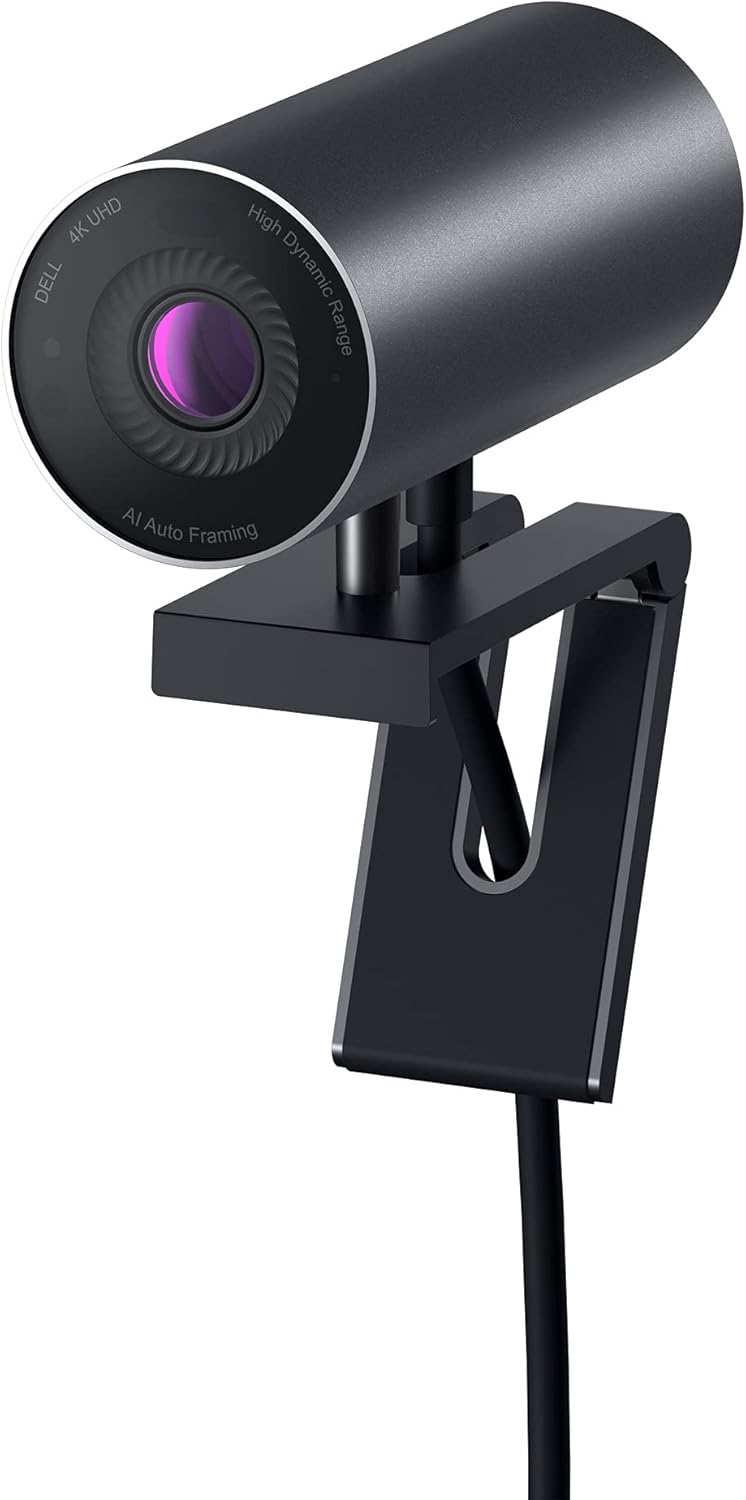
The Dell UltraSharp WB7022 is a purpose-built accessory for the Dell UltraSharp monitor ecosystem — technically accomplished on the imaging side, thoughtfully integrated, and unusually specialized. Its magnetic dock attachment, Windows Hello IR facial recognition, and AI auto-framing make it a clean companion for users already invested in Dell UltraSharp monitors. The decisive limitation is audio: the WB7022 has no built-in microphone at all. Because our framework weights audio at 25% and assigns a no-microphone webcam a zero on that axis — there is simply no audio hardware to evaluate — the WB7022’s otherwise strong specification set lands it at a composite 6.3, near the bottom of our rankings. For users who already run a dedicated headset or desk microphone, the imaging hardware is genuinely excellent. For anyone expecting an all-in-one camera-and-mic solution, the WB7022 cannot fill that role.
How We Scored It
Category Deep-Dives
Image Quality
9.0 / 10 30% weightingThe WB7022 uses a Sony STARVIS 8.3-megapixel sensor — an excellent imaging foundation that delivers clean, accurate 4K/30fps video across the broad range of lighting conditions typical in a home office. The Sony STARVIS sensor technology is the same family used across the premium webcam tier; the WB7022’s implementation is optimized for consistency and accuracy rather than raw low-light performance, and it delivers on that goal reliably. Color accuracy is strong, with natural skin tone rendering and well-balanced highlights and shadows in typical office lighting.
A distinguishing hardware feature is the built-in ambient light sensor, which provides automatic white balance adjustment based on the actual color temperature of the room’s lighting. Most webcams infer white balance from the image itself; the WB7022’s dedicated sensor measures ambient light independently, allowing it to set color temperature more quickly and more accurately than image-based inference systems. The practical effect is that the WB7022 adjusts smoothly and correctly when lighting conditions change — moving from fluorescent overhead light to afternoon window light to evening lamp — without the color temperature drift that camera-based white balance systems can exhibit during transitions.
AI auto-framing is implemented through Dell’s companion software and tracks the primary subject in the frame, recentering and zooming as the user moves. The system is well-calibrated for solo home office use — it does not over-react to minor positional adjustments, and it tracks larger movements cleanly without the jarring correction artifacts some AI framing implementations produce. The adjustable 65–90° field of view gives the WB7022 flexibility across different desk distances and call contexts. Combined with the ambient light sensor and auto-framing, the WB7022 offers more automatic optimization of its imaging output than many competitors in this evaluation.
Bottom line on image quality: A strong 4K imaging package with the distinctive advantage of an ambient light sensor for accurate automatic white balance. Image quality is excellent across typical home office conditions, and AI auto-framing adds practical value for users who move during calls.
Audio Performance
0 / 10 25% weightingThe Dell UltraSharp WB7022 has no built-in microphone at all. This is a deliberate design decision by Dell: the WB7022 was built as a pure imaging device, on the assumption that its target users — typically professionals in managed Dell environments — already have a headset, a dedicated USB microphone, or a monitor or dock that handles call audio. Independent reviews of the WB7022 have consistently flagged the absence of any onboard microphone as its single most notable omission for an otherwise premium webcam.
Our scoring framework weights Audio Performance at 25% of the composite score, and the comparison methodology states plainly that a webcam with no microphone at all receives a zero on that axis. This is not a judgment about audio quality — there is no audio hardware to evaluate — but a structural consequence of the framework, applied consistently across the category. A camera that captures no sound cannot earn any of the 25% allocated to audio, and that single fact is what moves the WB7022 from the top of an imaging-only ranking down to a composite 6.3. For buyers who already own a dedicated microphone or headset, this zero is largely academic; for buyers expecting an all-in-one camera-and-microphone solution, it is decisive.
Bottom line on audio performance: The WB7022 has no microphone — none. If you rely solely on a webcam for call audio, it cannot do the job, and the framework scores it a 0 on the 25% audio axis accordingly. If you already run a separate microphone or headset, the omission may not matter to you, but it remains the defining limitation of an otherwise strong camera.
Usability & Features
8.5 / 10 20% weightingThe WB7022’s most distinctive usability feature is its Windows Hello IR camera. The infrared sensor enables facial recognition sign-in on Windows 10 and Windows 11 — hardware-level biometric authentication that does not depend on a PIN or password. For Windows users who rely on Windows Hello for seamless laptop or desktop sign-in, the WB7022 adds this capability without requiring a laptop with a built-in IR sensor. It is one of only a handful of external webcams that support Windows Hello, and one of just two in our evaluation that do so, alongside the Logitech Brio 4K. For Windows-heavy professional environments, this is a non-trivial feature: passwordless facial recognition sign-in is meaningfully faster and more convenient than PIN-based authentication across a full workday of lock-unlock cycles.
The magnetic dock mounting system is designed specifically to mate with Dell UltraSharp monitors that include a magnetic dock on the top bezel. The WB7022 attaches and detaches with a single motion, without requiring a clip mechanism or tightening, and routes its USB-C cable through the monitor’s cable management system. For users with compatible Dell UltraSharp monitors, this is a genuinely elegant integration — the camera sits precisely at the center of the monitor’s top bezel, maintains correct alignment automatically, and disappears into the monitor’s visual profile more cleanly than any clip-mount camera. The magnetic dock also supports universal clip mounting for non-Dell or non-compatible monitor setups, so the WB7022 is not unusable without a Dell monitor — it simply loses its most distinctive mounting advantage.
Platform certifications cover Microsoft Teams, Zoom, and Google Meet, with plug-and-play operation on Windows and macOS. Dell’s companion software provides FOV adjustment and framing controls without requiring the application to be active during use. The usability score of 8.5 reflects that the WB7022’s most compelling features — magnetic dock and Windows Hello — are meaningful primarily within the Dell ecosystem, which narrows their practical benefit relative to the MX Brio 705’s more universally accessible feature set at the same score tier.
Bottom line on usability and features: Windows Hello IR is a standout feature, shared in our evaluation only with the Logitech Brio 4K. The magnetic Dell dock is an elegant integration for compatible monitor setups. Feature quality is high, but the ecosystem dependency constrains who benefits most from the WB7022’s strongest capabilities.
Value
6.5 / 10 15% weightingThe WB7022’s value score of 6.5 reflects a genuine and honest assessment that is worth explaining directly. The WB7022 is priced at the same flagship tier as the Logitech MX Brio 705. Both are 4K webcams with AI auto-framing and USB-C connectivity — but the MX Brio 705 is a complete camera-and-microphone package, whereas the WB7022 has no microphone at all. The MX Brio 705 also pairs a larger Sony STARVIS sensor (1/1.5″ vs. the WB7022’s standard STARVIS) with beamforming microphones, adjustable field of view, Show Mode, and a more mature software ecosystem — at the same price. What the WB7022 adds in return is Windows Hello IR and the magnetic Dell dock. For users without a Dell UltraSharp monitor, those two differentiators are irrelevant or inaccessible, which means they are paying flagship money for a webcam that is technically strong on imaging but, lacking any microphone, is not competitive with the MX Brio 705 on a per-dollar basis when evaluated independently of the Dell ecosystem.
For users with a Dell UltraSharp monitor, the value equation shifts. The magnetic dock integration and Windows Hello capability are genuine, non-replicable advantages that the MX Brio 705 cannot provide at any price. Windows Hello facial recognition adds daily convenience that compounds across hundreds of lock-unlock cycles; the magnetic dock adds a cleanliness and integration that clip-mount cameras cannot match on compatible monitors. For these users, the WB7022 is the right choice over the MX Brio 705 at the same price, because it delivers ecosystem features the MX Brio 705 simply does not have. The value scoring reflects the evaluation from the perspective of the full market — non-Dell users are paying for features they cannot use, which is a real cost.
Bottom line on value: A 6.5 value score is not a condemnation of the WB7022 — it is an honest reflection that its most distinctive features are ecosystem-locked. For Dell UltraSharp monitor users, value improves substantially. For everyone else, the MX Brio 705 delivers more per dollar at the same price.
Physical Design
9.0 / 10 10% weightingThe WB7022’s physical design is unmistakably from Dell’s UltraSharp product family — matte black plastic with clean lines, minimal visual complexity, and the same aesthetic language as Dell’s UltraSharp monitors. It looks at home on top of a Dell monitor in a way that third-party accessories often do not. The magnetic dock attachment — when used with a compatible Dell UltraSharp monitor — is a design highlight: the camera seats itself precisely at the center of the bezel with a satisfying click and holds firmly throughout the day, including during gesturing or minor desk vibration. It detaches just as cleanly with a single pull. This mounting experience is meaningfully better than any clip mechanism we evaluated.
The privacy solution is a magnetic cap rather than an integrated shutter, which is the one design trade-off worth noting. Magnetic caps are more secure than removable snap caps but are still a separate physical component that can be displaced or lost. For a camera at this price and in this category, an integrated sliding shutter — as found on the MX Brio 705 and Razer Kiyo Pro Ultra — would be the preferred solution. That said, the magnetic cap is well-executed: it attaches with a positive engagement and does not slip during normal use. The USB-C cable is removable, a practical advantage for users who want to specify cable length or replace a damaged cable without returning the camera. Build quality throughout is consistent with Dell’s UltraSharp standard: solid without flex, well-finished, and built to last a multi-year working life.
Bottom line on physical design: The magnetic Dell dock is the best mounting experience in our evaluation for compatible setups. The magnetic privacy cap is adequate but not as elegant as an integrated shutter. Overall build quality and Dell ecosystem aesthetic integration are excellent.
About the Manufacturer
Tech
Dell Technologies was founded in 1984 by Michael Dell from a University of Texas dorm room, initially selling custom-configured IBM PC-compatible computers directly to consumers — a distribution model that was novel for its era. The company grew into one of the world’s largest technology companies, with a product portfolio spanning enterprise servers and storage, networking, PCs, and displays. Dell went public in 1988, took private in 2013, and returned to public markets in 2018 following the acquisition of EMC.
The UltraSharp product line represents Dell’s professional-grade accessories and displays, distinguished by factory color calibration, consistent quality control, and comprehensive warranty coverage. The UltraSharp WB7022 webcam was designed as a companion to the UltraSharp monitor line, sharing the same aesthetic, quality standards, and — on compatible models — a direct physical integration through the magnetic dock system. Dell’s approach to the WB7022 is characteristically enterprise-oriented: Windows Hello IR for authentication, Teams and Zoom certification, and a 3-year warranty that matches the standard UltraSharp monitor warranty period.
Dell’s 3-year warranty on the WB7022 is above the industry standard for consumer webcams, most of which carry 1-year or 2-year warranties. For professional users and organizations standardizing on Dell hardware, this extended coverage reduces total cost of ownership over a multi-year deployment. Dell webcams and monitors are sold through Dell’s own retail and business channels, authorized resellers, and on Amazon.