PA278CGV
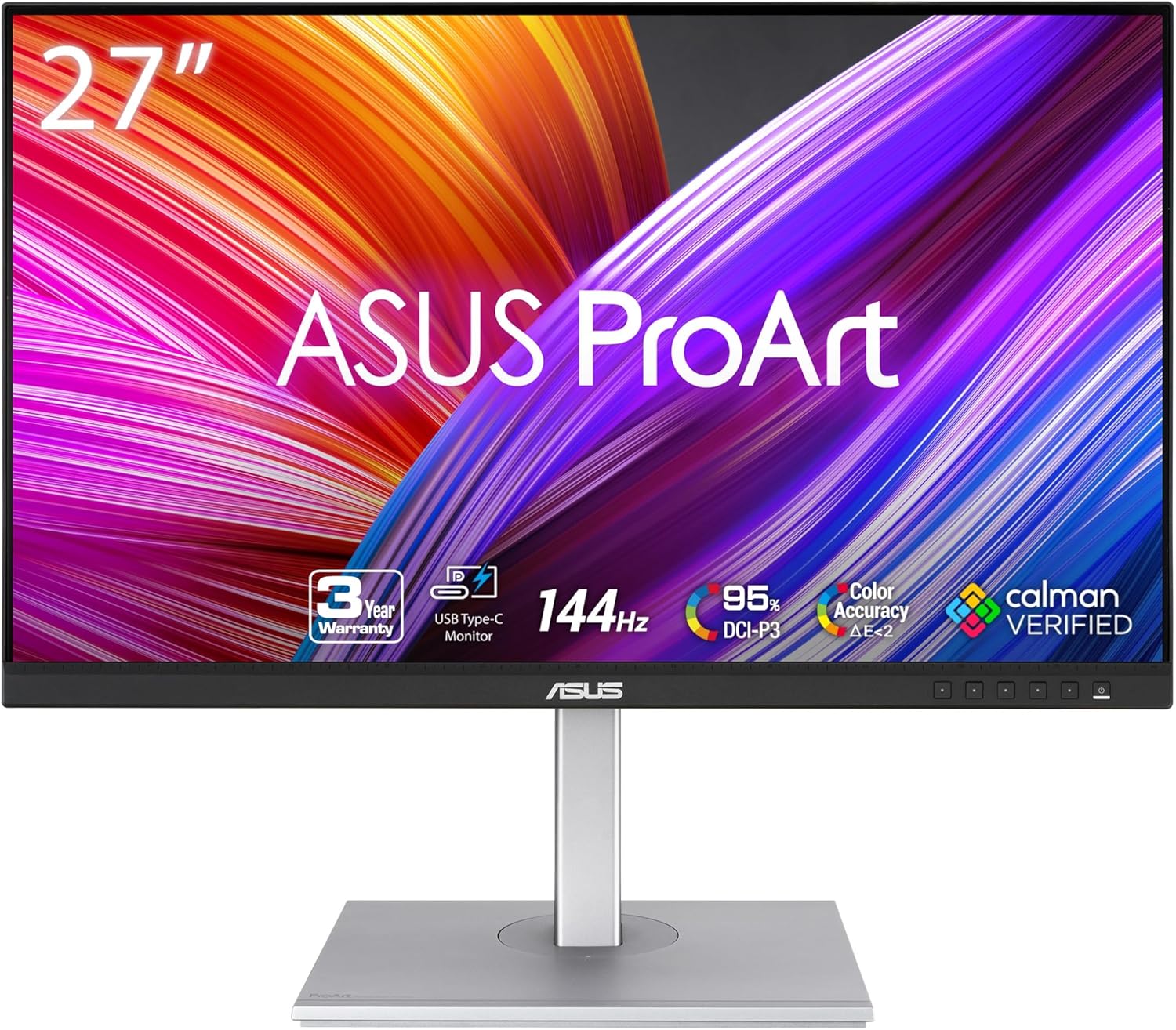
The ASUS ProArt PA278CGV makes a specific case that no other monitor in our guide makes: factory-calibrated color accuracy and 165Hz refresh rate in the same 27-inch panel. Most ProArt monitors are 60Hz tools for color work; most 165Hz monitors are gaming displays without meaningful calibration. The PA278CGV bridges that gap at a mid-range price, with a full ergonomic stand and USB-C charging — making it the strongest choice for hybrid work-and-gaming home offices that still need reliable color.
How We Scored It
Category Deep-Dives
Image Quality
7.5 / 10 30% weightingThe PA278CGV’s IPS panel delivers 100% sRGB and 95% DCI-P3 color coverage, factory-calibrated to Delta E below 2. In practical terms, this means colors are accurate enough for web design, photo editing, and content review without requiring an external colorimeter at purchase — a meaningful differentiator from gaming-oriented panels that advertise broad color gamuts without calibration documentation. ASUS ships a calibration report in the box confirming the panel’s measured performance, which is consistent with the ProArt line’s approach to specification transparency.
The 1440p resolution (2560×1440) at 27 inches delivers a pixel density of approximately 109 PPI — sharp enough for standard text and document work, with content scaling well in both Windows and macOS. Text rendering at 27 inches and 1440p is noticeably crisper than a 1080p display at the same size, and the step down from 4K at this diagonal is less significant than it becomes at higher pixel densities. Users whose workflow includes high-resolution photography, video editing, or detailed graphic work may find the resolution limit more noticeable; for document-heavy home office use, 1440p at 27 inches is a comfortable working resolution.
The standard IPS contrast ratio of 1000:1 is the primary image quality limitation relative to higher-scoring monitors in our guide. The Dell U4025QW’s IPS Black panel achieves approximately 2000:1 at significantly higher cost, and premium OLED monitors deliver contrast ratios that make IPS black levels look flat by comparison. For typical home office use in a moderately lit environment, 1000:1 is functional. For dark-room viewing or HDR content, the standard IPS contrast becomes a perceptible ceiling.
The 350-nit typical brightness is appropriate for indoor environments and covers the range where most home office users work. DisplayHDR 400 certification means the panel meets the baseline HDR standard, though 400 nits peak is near the minimum threshold where HDR content shows meaningful improvement over standard dynamic range. HDR should be treated as a secondary feature here, not a primary one.
Bottom line on image quality: Factory-calibrated 95% DCI-P3 coverage with a calibration report in box is the standout. Resolution and contrast are solid mid-range — not a 4K or IPS Black panel, but accurate color is more than most 165Hz monitors deliver.
Connectivity & Versatility
7.0 / 10 22% weightingThe PA278CGV’s connectivity covers the practical home office range without reaching the integration level of premium monitors. The USB-C port at 65W Power Delivery charges most laptops over a single cable while carrying display signal — covering the MacBook Air, 13-inch MacBook Pro, and most thin-and-light Windows laptops whose peak charge rate is 65W or below. Note that 15-inch and 16-inch MacBook Pro models draw up to 140W and 96W respectively at peak load; 65W will charge these laptops but may not sustain charge under full CPU load. The USB-C port carries display via DisplayPort Alt Mode, not Thunderbolt — this distinction matters for users who need Thunderbolt’s data bandwidth or daisy-chaining capabilities.
The four USB-A 3.2 Gen 1 ports form a functional hub for peripherals — keyboard, mouse, webcam, and a USB drive fit comfortably. This is a practical inclusion that removes the need for a separate USB hub for users with standard peripheral sets. A single DisplayPort 1.2 output enables daisy-chaining to a second monitor at up to 1440p; the DP 1.2 spec (rather than 1.4) limits the maximum resolution and refresh rate available to a daisy-chained display. Two HDMI 2.0 ports round out the input set, allowing connection from a second computer or gaming console without a switch.
The 7.0 connectivity score reflects a package that is practical and complete for most single-workstation home office setups, but short of the integration depth found in higher-ranked monitors. The U4025QW’s dual Thunderbolt 4 ports, built-in 4K webcam, Ethernet, and KVM switching at 140W represent a qualitatively different level of desk consolidation. The LG 34WQ75C-B’s 90W USB-C charging covers more demanding laptops. Within the PA278CGV’s competitive tier, the hub and 65W PD combination is reasonable; the absence of Thunderbolt is the primary functional gap for users with heavier connectivity requirements.
Bottom line on connectivity: 65W USB-C single-cable connection, four USB-A hub ports, and dual HDMI cover most home office workflows. No Thunderbolt; 65W PD may not keep pace with high-performance laptop charging under sustained load.
Value for Money
8.0 / 10 20% weightingValue is the PA278CGV’s strongest argument and the clearest reason to choose it over alternatives. The combination of factory-calibrated ProArt color accuracy and 165Hz refresh rate in a single panel is rare at this price point, and the full ergonomic stand adds further value that budget alternatives typically strip out. Most monitors in this price range make you choose between color accuracy and high refresh rate; the PA278CGV does not force that tradeoff.
The comparison to the PA279CRV — ASUS’s own 4K ProArt at rank #6 — is worth making explicit. The PA279CRV is a better monitor for color-critical work: 4K resolution, 99% DCI-P3, Calman Verified certification, and 96W USB-C PD. If color accuracy is the primary requirement and you do not need high refresh rate, the PA279CRV is the stronger choice. The PA278CGV earns its 8.0 value score specifically for users whose workflow genuinely benefits from both accurate color and fast motion rendering — video editors who also game, designers with dual work/leisure monitors, or home offices where the monitor covers both extended work sessions and evening entertainment.
Compared to gaming monitors in the 165Hz 1440p category — the more direct market competition — the PA278CGV carries a modest price premium, justified entirely by the ProArt factory calibration and ASUS Eye Care certification. Gaming monitors at similar specs routinely ship without calibration documentation; the PA278CGV ships with a measured calibration report. For buyers who need accurate color and are considering a 165Hz gaming monitor, the calibration premium is narrow and easy to justify.
Bottom line on value: Best-value ProArt panel if you need both color accuracy and high refresh rate. If you only need one of the two, other monitors in our guide deliver each capability at a higher score in the relevant category.
Ergonomics & Build
8.0 / 10 15% weightingThe PA278CGV ships with ASUS’s full four-axis ProArt stand: 150mm height adjustment, ±30° swivel, −5° to +23° tilt, and 90° pivot for portrait orientation. This is the complete ergonomic stand specification — the same configuration found on monitors costing significantly more. Height adjustment range of 150mm covers the seated position variation for users from short to tall; the pivot to portrait mode is useful for document review, code, and long-form reading. The stand base is solid and does not flex during adjustment, which is a build quality indicator that separates ProArt products from monitors using stamped sheet-metal stands.
The thin bezel treatment on three sides reduces the visual bulk of the monitor on the desk and makes multi-monitor configurations more natural — the gap between two PA278CGVs placed side by side is minimal. The matte anti-glare coating (3H hardness) controls reflections effectively in typical home office lighting conditions without introducing the graininess that some aggressive anti-glare coatings impose. The coating is a standard implementation that performs well without calling attention to itself.
Build quality is consistent with the ProArt line’s commercial standards: panel flex is minimal, the stand mechanism is firm and positively detented at its height adjustments, and the rear cable management guides route cables cleanly. The OSD (on-screen display) is accessible via a joystick button on the rear — a better navigation experience than the row of unlabeled buttons used on monitors that have not updated their OSD interface in years. The joystick allows single-handed menu navigation for input switching, refresh rate changes, and color profile selection.
Bottom line on ergonomics and build: Full four-axis ProArt stand is standard-setting at this price tier. Solid construction, good matte coating, and a joystick OSD round out a well-built physical package.
Eye Comfort
7.5 / 10 8% weightingThe PA278CGV carries ASUS Eye Care certification, which covers flicker-free backlight operation (DC dimming rather than PWM) and hardware-level blue light reduction. Flicker-free backlighting eliminates the rapid on-off cycling that some PWM-dimmed displays use for brightness control at lower levels — a relevant consideration for extended work sessions where subliminal flicker may contribute to eye fatigue. The hardware low blue light filter reduces high-energy short-wavelength light without requiring third-party software overlays that introduce color distortion.
The minimum brightness floor of approximately 50 nits is functional but not exceptional. In a dim evening environment, 50 nits is comfortable for most users, though monitors with lower brightness floors (some reach 20 nits or below) allow more comfortable low-light use without relying on software brightness adjustment. This is a minor limitation in practice but worth noting for users who frequently work or read on monitors in dim rooms.
The IPS panel’s wide viewing angles mean color accuracy is maintained at off-axis viewing positions — a practical eye comfort factor for users whose desk setup places them off-center relative to the display. The matte anti-glare coating manages specular reflections from windows or overhead lights without the color washout of high-gloss alternatives, reducing the visual fatigue associated with working against reflected light sources.
Bottom line on eye comfort: Flicker-free DC dimming and hardware blue light filter are the core credentials. Minimum brightness floor of ~50 nits is adequate for most environments; users working in very dim conditions may find it marginally high.
Refresh Rate & Responsiveness
9.5 / 10 5% weightingAt 165Hz with 1ms GTG response time and Adaptive Sync, the PA278CGV is the highest-refresh-rate monitor in our guide — and the only one to pair high refresh rate with ProArt factory calibration. The 9.5 score reflects performance that is genuinely best-in-class for this specification in the context of a professional monitor. Most monitors in our guide prioritize color accuracy and connectivity at 60Hz; the PA278CGV’s 165Hz performance is a meaningful differentiator that increases the monitor’s overall score despite this category’s modest 5% weighting.
In practical terms, 165Hz produces visibly smoother motion than 60Hz across all content — cursor movement, scrolling, window dragging, and video playback all benefit measurably. The improvement from 60Hz to 165Hz is larger than the improvement from 144Hz to 165Hz; the 21Hz step between common gaming monitor speeds is audible in competitive play but less significant in general content consumption. For home office users who have not used a high-refresh monitor, the transition from 60Hz to 165Hz is one of the more immediately noticeable display upgrades available.
Adaptive Sync (VESA Adaptive-Sync / FreeSync Premium compatible) enables variable refresh rate synchronization with compatible GPUs, eliminating screen tearing at refresh rates below the panel’s maximum. G-Sync Compatible certification means NVIDIA GPU users can also use variable refresh rate without requiring DisplayPort-specific workarounds. This is a clean implementation that covers both AMD and NVIDIA workflows without mode switching.
Bottom line on refresh rate: 165Hz with 1ms GTG and Adaptive Sync is best-in-class for this monitor guide — and uniquely paired with ProArt factory calibration. This category’s 5% weight limits its impact on the total score, but the real-world usability benefit is among the largest single-spec improvements available at this price tier.
About the Manufacturer
PRO
ART
ASUS is a Taiwanese multinational electronics company founded in 1989, and the ProArt line is its professional creator-focused product sub-brand covering monitors, workstations, and accessories. ProArt monitors are designed for users whose work depends on accurate color reproduction — graphic designers, photographers, video editors, and architects — and the line is distinguished by factory calibration, specification transparency, and color accuracy documentation that most consumer display brands do not provide.
The ProArt monitor line is positioned between consumer gaming displays and enterprise-grade color-critical displays from brands like Eizo and NEC. ASUS publishes Delta E measurements and includes factory calibration reports with ProArt products, allowing buyers to verify panel performance against the specifications claimed. The PA278CGV’s inclusion of a calibration report at its price point reflects the ProArt line’s approach to making professional color accuracy accessible below the price tier where traditional professional monitors have historically operated.
ASUS’s warranty for ProArt monitors is three years with dead pixel policy coverage — a standard professional monitor warranty that reflects the line’s creator-market positioning. The support infrastructure is consistent with ASUS’s broader commercial operations rather than the more limited after-sales support typical of consumer electronics brands. ProArt panels are manufactured by AU Optronics (AUO) or LG Display depending on the specific model, and panel quality consistency across the production run is supported by ASUS’s factory calibration and QC process.