Brio 500
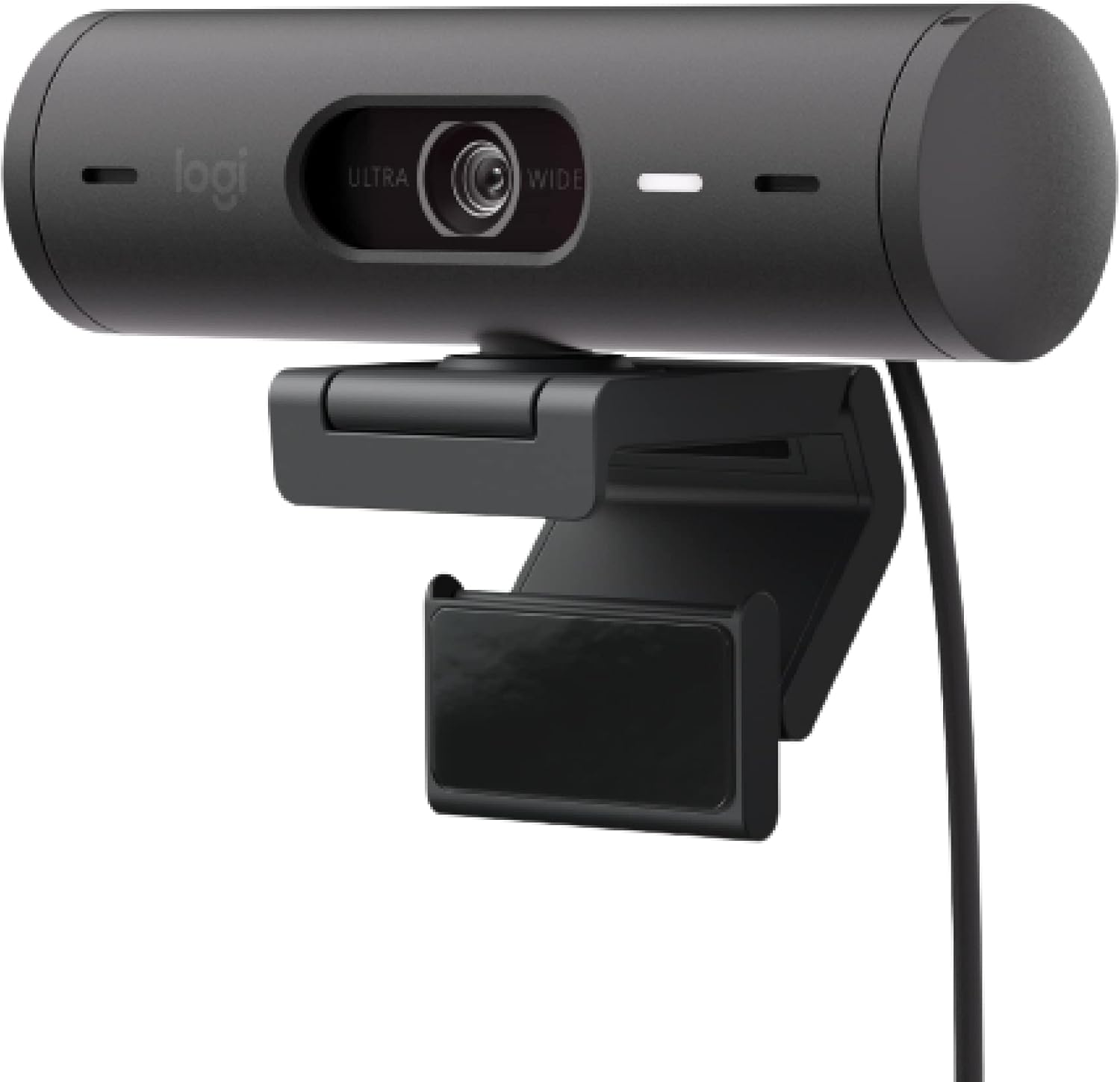
The Logitech Brio 500 is the most capable 1080p webcam in Logitech’s consumer lineup — a compact, well-built device that delivers RightLight 4 HDR, the signature Show Mode desk-tilt feature, and dual noise-reducing microphones at a price point well below Logitech’s 4K flagship. It is not a perfect webcam, but it is a genuinely well-rounded one that earns its position as a credible choice for home office workers who want meaningful feature depth without the premium of a 4K camera.
How We Scored It
Category Deep-Dives
Image Quality
8.0 / 10 30% weightingThe Brio 500 shoots 1080p at 30fps — full HD, not 4K — but Logitech has not simply dropped a budget sensor into a mid-range enclosure. The camera uses a 4-megapixel sensor with a glass lens and continuous autofocus, a combination that produces noticeably sharper results than the plastic-lens, fixed-focus webcams that dominated the category just a few years ago. At standard video call resolutions and sizes — a talking head on a 1080p or even 1440p monitor — the output is clean and detailed enough that viewers will not feel they are looking at a degraded image.
RightLight 4 is Logitech’s fourth-generation automatic light correction system, and its presence on the Brio 500 is meaningful. Earlier RightLight implementations would frequently overexpose bright windows or underexpose the speaker’s face when dealing with backlighting. RightLight 4 applies HDR processing to balance the frame more intelligently, handling common home office conditions — desk lamps at night, windows behind you in daytime, overhead fluorescents of inconsistent color temperature — without requiring any manual intervention. The automatic color balance and exposure adjustment are reliable enough that most users will never need to touch a setting. Where RightLight 4 on the MX Brio 705 operates on a significantly larger sensor with more data to work with, the Brio 500’s implementation is still the best-in-class light correction available at this price tier.
Autofocus is continuous with a glass lens — a specification that matters more in practice than it might appear on paper. Glass optics produce meaningfully sharper resolving power than plastic alternatives, and continuous autofocus ensures that brief head movements or positional shifts do not leave you blurry for seconds at a time. The adjustable FOV (65°, 78°, or 90° diagonal, configurable in Logi Tune) allows users to set the frame width that best suits their workspace — wider for shared screens or single-monitor setups, narrower for tighter portrait framing. The 4x digital zoom is available as a software option but degrades resolution proportionally; it is best used sparingly for occasional close framing rather than as a daily setting.
The honest caveat is resolution: 1080p at 30fps is a ceiling that matters for some users. If you export video, produce professional streaming content, or plan to use your webcam as a document camera requiring fine text legibility at a distance, the Brio 500’s resolution limit will be felt. For standard video calling — Zoom, Teams, Meet — 1080p at 30fps is more than adequate, and those platforms typically compress output before delivery anyway. But users who want a camera that doubles as a document scanner or who produce content where resolution headroom enables post-production flexibility should look at the MX Brio 705 instead.
Bottom line on image quality: RightLight 4 HDR on a 4MP glass-lens sensor delivers genuinely good 1080p results for video calling, with solid automatic light correction that handles typical home office conditions without user intervention. The 30fps ceiling and 1080p resolution cap are real limitations for demanding use cases but are not felt in everyday call usage.
Audio Performance
7.0 / 10 25% weightingThe Brio 500 includes dual microphones with beamforming noise reduction — a meaningful step above the single-element microphones found in budget webcams, though a step below the more aggressively tuned AI noise cancellation in the MX Brio 705. The dual-element configuration allows the system to apply directional filtering: using the spatial relationship between the two microphones to focus on sounds arriving from directly in front of the camera and suppress signals from other directions. In practice, this means the Brio 500 handles moderate background noise — a fan running nearby, traffic through a window, intermittent keyboard typing — reasonably well without requiring the speaker to be close to the camera.
Logitech’s published pickup range is approximately four feet, and independent testing confirms voice capture is clear and intelligible across that range. The microphone system is optimized for voice rather than music, applying selective frequency shaping that prioritizes mid-range speech frequencies and rolls off low-frequency rumble and high-frequency hiss. The result is call audio that is consistently clean under typical home office conditions — not the richest or most natural-sounding microphone, but free from the hollow, over-processed quality that affects many competing webcam mics at this price point.
The 7.0 audio score reflects an honest gap between the Brio 500 and top-performing webcam microphones in this evaluation. The noise reduction is effective but not sophisticated enough to handle demanding acoustic environments: a loud HVAC system, a second person talking in the room, or significant echo from bare walls will all cause audible degradation in call audio. Users in noisy environments or who work in rooms with significant acoustic problems will find the Brio 500’s audio system outpaced. In a reasonably quiet room — which describes most dedicated home offices — the dual microphones perform well above their price tier and comfortably outclass laptop or phone alternatives.
Platform compatibility is full: the Brio 500 carries Microsoft Teams, Google Meet, and Zoom certifications, meaning Logitech has validated the microphone’s performance in each major conference platform. This matters not for audio quality per se but for plug-and-play reliability — the noise processing and audio settings work predictably across platforms without requiring per-app configuration.
Bottom line on audio performance: Above-average webcam microphone performance with beamforming noise reduction that handles typical home office conditions well. Not a substitute for a dedicated external microphone in noisy environments, but a meaningful upgrade over built-in laptop mics and more than adequate for daily video calling in a reasonably quiet workspace.
Usability & Features
7.5 / 10 20% weightingShow Mode is the Brio 500’s defining feature — and one of the few webcam features that genuinely changes how you work rather than simply improving image statistics. The mechanism is physical: you tilt the camera downward by hand, and the Brio 500 automatically reorients the image so that what is on your desk appears right-side up to your call participants. When you tilt back up, the image returns to standard face-framing orientation. There is no software toggle required, no mode switch to navigate — the reorientation is automatic and instant. For users who regularly need to show physical documents, sketches, printed materials, or physical products during calls, Show Mode eliminates the awkward process of picking up the camera and hand-holding it over your desk.
The Logi Tune software (Windows and macOS) provides camera control beyond the default settings: FOV adjustment between 65°, 78°, and 90°; 4x digital zoom; auto-framing behavior; manual overrides for white balance and exposure; and noise reduction intensity. The software is stable and well-designed, though lighter in features than the Logi Options+ ecosystem available to MX Brio 705 users — notably, Logi Tune does not integrate cross-device control for Logitech keyboards and mice. For most users, default settings are sufficiently well-tuned that Logi Tune will be used once during setup and rarely again. The plug-and-play reliability is complete: connect the Brio 500 via USB-C and it appears as a standard UVC-compliant webcam on all supported platforms without any driver installation required.
The built-in privacy cover is a slide-forward mechanism that physically blocks the lens — more reliable than software privacy modes and more convenient than magnetic or clip-on covers that can be misplaced. The USB-C cable is five feet long and permanently attached — practical for most desk configurations, though the fixed cable is a limitation for users who want to route the cable carefully or who use a cable management system that requires a specific cable length. Platform certifications (Teams, Meet, Zoom) are all present, covering the full range of enterprise and consumer video conferencing tools.
What holds the usability score from reaching higher is the absence of AI auto-framing available in competing cameras at similar price points. The Brio 500 does not automatically track you if you move around within the frame — you are responsible for staying within the field of view you have set. For users who sit relatively still during calls, this is a non-issue. For users who present standing, move to a whiteboard, or work from positions that vary call-to-call, the lack of tracking is a real limitation relative to cameras like the Obsbot Meet 2, which tracks subjects actively.
Bottom line on usability and features: Show Mode is genuinely practical and differentiates the Brio 500 from most 1080p competitors. Logi Tune provides solid software control, and platform certifications are comprehensive. The lack of AI auto-framing is the primary gap versus cameras at a similar price that include motorized tracking.
Value
7.5 / 10 15% weightingThe Brio 500 occupies a competitive mid-market position. The relevant comparison set at this price includes the Obsbot Meet 2, the Elgato Facecam MK.2, and a range of 1080p options from Razer and AVerMedia. What the Brio 500 offers that most competitors in this range do not is the combination of RightLight 4 HDR, Show Mode, and a privacy shutter in a single package from an established manufacturer with broad platform certification. These are meaningful differentiators — particularly RightLight 4, which is typically found only in Logitech’s more expensive cameras.
The value case has some nuance. Users who prioritize AI auto-framing over Show Mode will find the Obsbot Meet 2 a more compelling choice at a similar price — the Meet 2 offers motorized subject tracking that the Brio 500 cannot match. Users who want raw image resolution will find the Brio 500 capped at 1080p while other options push to 2K or 4K. The Brio 500 is most compelling for users who have identified its specific combination of features — particularly Show Mode, the privacy cover, and strong light correction — as priorities, and who do not need motorized tracking or high-resolution output. Within that defined use case, the value proposition is strong.
Logitech’s retail pricing for the Brio 500 has been consistent since launch, without the discount volatility common in the webcam category. The camera is available in three colors — graphite, off-white, and rose — at equivalent price points, which is unusual in the category and adds practical value for users coordinating desk aesthetics. The five-year-old design remains competitive, which is a testament to how thoughtfully Logitech spec’d this camera when it launched and how relatively slowly the 1080p webcam category has evolved in the interim.
Bottom line on value: Strong value for a specific buyer profile — those who want RightLight 4 HDR, Show Mode, and a built-in privacy shutter from a manufacturer with full platform certification. Loses some value points against competing cameras with AI auto-framing or higher resolution at similar prices, but remains a well-rounded mid-market choice with a defined feature advantage.
Physical Design
7.0 / 10 10% weightingThe Brio 500 has a distinctive wide, cylindrical chassis — broader than a typical webcam and lower-profile than a turret-style camera. The design is immediately recognizable as different from the rectangular bar form factor common in the category, and it functions as more than an aesthetic choice: the wider base gives the camera stability when tilted downward for Show Mode, and the cylinder profile keeps the lens centered naturally regardless of mount position. At 2.8 ounces without stand, it is genuinely lightweight — you will not notice it on top of a thin-bezel monitor. The chassis is constructed from post-consumer recycled plastic (68% for graphite, 54% for off-white and rose), a sustainability credential that does not affect performance but reflects a manufacturing commitment increasingly relevant to corporate procurement.
The magnetic clip with micro-suction pad is one of the Brio 500’s most practical design decisions. The magnetic connection between camera and clip allows quick removal and remounting — useful for switching between monitor and desk stand — and the micro-suction pad grips the top of your monitor securely without adhesive residue. The clip accommodates a range of monitor thicknesses and does not require tightening a tension screw as traditional webcam clips do. The included desk stand provides a stable freestanding option, useful for laptop users without an external monitor. The five-foot USB-C cable is adequate for most desktop configurations and exits cleanly from the base of the camera.
The built-in privacy cover slides forward to cover the lens mechanically — an integrated solution that requires no separate accessory and cannot be forgotten or lost. Three color options (graphite, off-white, rose) are available in the same configuration, which is genuinely unusual in the webcam category where color options are typically an afterthought applied to a single SKU. The 7.0 physical design score reflects strong marks for the magnetic mount system, privacy cover, and color options, offset by the wider-than-average footprint and the permanently attached cable — a limitation for users who want cable routing flexibility or who connect and disconnect the camera frequently.
Bottom line on physical design: The magnetic clip-and-suction-pad mount system is practically excellent and differentiates the Brio 500 from clip-and-tension-screw alternatives. The privacy cover is well-integrated, three color options are a practical advantage, and the recycled plastic construction is a genuine credential. The wider footprint and fixed cable are modest limitations in an otherwise thoughtful physical package.
About the Manufacturer
tech
Logitech has been the world’s largest PC peripheral manufacturer for decades, with a webcam portfolio spanning from entry-level to 4K professional. The Brio 500 sits in the mid-tier of that portfolio — above the C920 and C922 legacy cameras, below the MX Brio 705 flagship — and represents Logitech’s answer to the question of how many premium features can be delivered at a 1080p price point. Logitech’s scale means platform certifications (Teams, Meet, Zoom), mature companion software, and consistent long-term availability — reliability factors worth accounting for when purchasing a peripheral you expect to use daily for several years. Full details on Logitech’s history and product philosophy are covered in our MX Brio 705 review.