Kiyo Pro Ultra
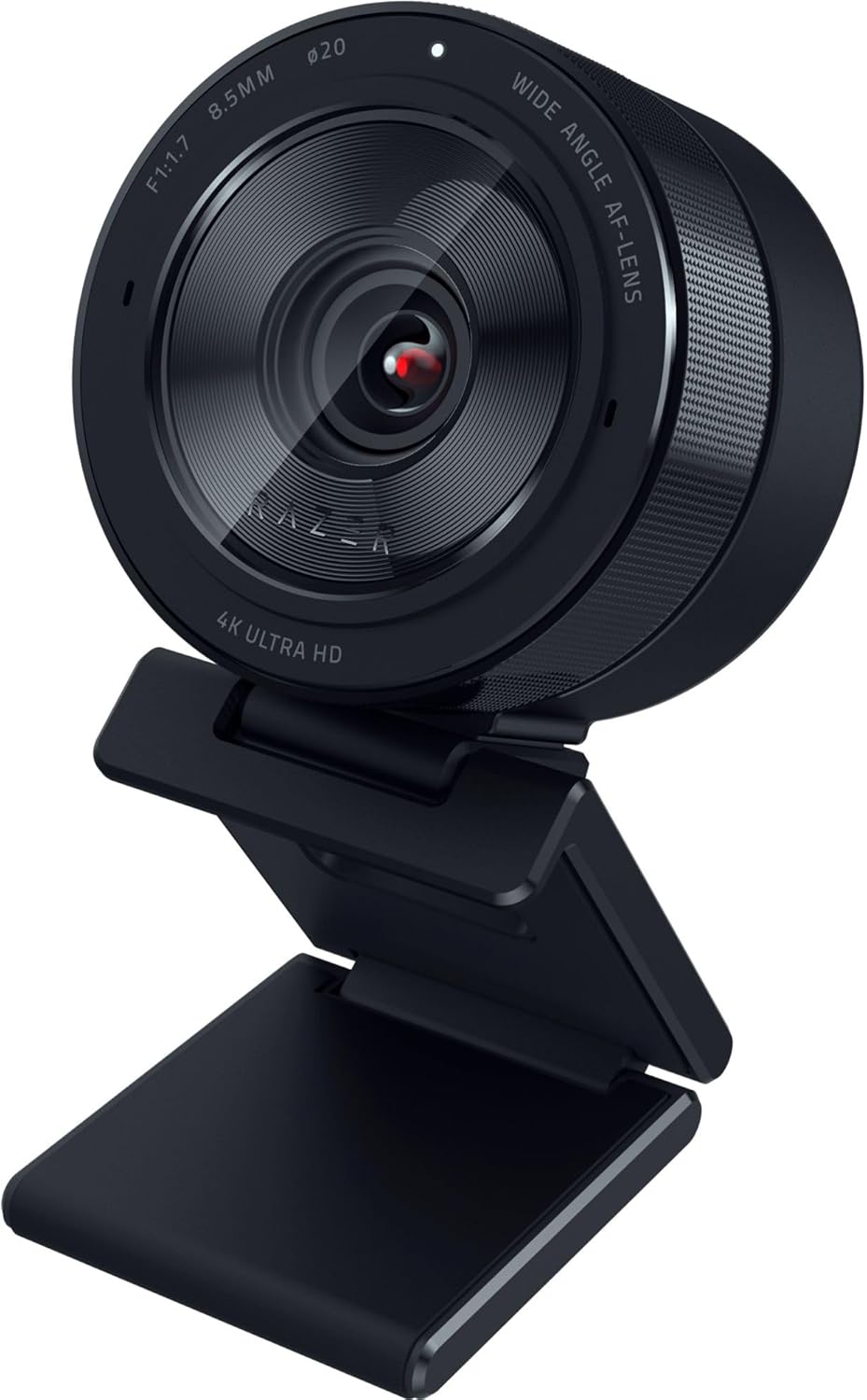
The Razer Kiyo Pro Ultra earns its #2 ranking on the exceptional hardware distinction of its 1/1.2″ Sony STARVIS 2 sensor — which Razer billed at the camera’s 2023 launch as the largest imaging sensor ever put in a webcam. In low-light conditions that expose the limitations of smaller sensors, the Kiyo Pro Ultra is simply the best-performing webcam in our evaluation. That hardware achievement carries one significant caveat that must be stated plainly: the Kiyo Pro Ultra includes no built-in microphone. Users who purchase it will need to plan for a separate audio solution — a USB or XLR condenser microphone, or a quality headset. For those already equipped with dedicated audio, or willing to invest in it, the Kiyo Pro Ultra’s image quality justifies the ranking decisively. For users expecting a webcam to handle audio as well as video, it is the wrong choice at this price point.
How We Scored It
Category Deep-Dives
Image Quality
9.5 / 10 30% weightingThe Kiyo Pro Ultra’s defining hardware characteristic is its 1/1.2″ Sony STARVIS 2 sensor — which Razer billed at the camera’s 2023 launch as the largest imaging sensor ever put in a consumer webcam, and by a significant margin. For context: most premium webcam sensors measure between 1/2″ and 1/3″ diagonally. The Kiyo Pro Ultra’s 1/1.2″ sensor has roughly 2.5 times the physical area of a typical 1/2″ sensor. This is not a marginal improvement — it is a fundamentally different category of light-gathering capability. Larger sensors capture more photons per pixel, which translates directly to lower noise at a given exposure, better dynamic range, and the ability to maintain clean, sharp video in low ambient light levels where smaller-sensor cameras produce visibly noisy or underexposed output.
Paired with an f/1.7 aperture — the widest in our evaluation — the Kiyo Pro Ultra’s optical system is optimized for light throughput in a way that no competing webcam can match. The f/1.7 aperture admits approximately 36% more light than an f/2.0 aperture at equivalent shutter speed, which has a direct and visible effect in dim environments: home offices lit by lamps rather than overheads, evening calls, rooms with insufficient overhead lighting. The practical result is that the Kiyo Pro Ultra can produce broadcast-quality video in lighting conditions that push other webcams into unacceptable noise territory. For professional contexts where you want to look genuinely excellent on video — not just adequate — the Kiyo Pro Ultra’s imaging hardware is the standard against which everything else is measured.
Razer Synapse provides manual control over ISO, shutter speed, and white balance — a level of manual override capability that most webcam companion apps do not offer. This is both a strength and a practical consideration: configuring these settings requires opening the Synapse preview window, which some workflows find intrusive. The camera’s automatic settings are excellent and will satisfy most users without manual adjustment, but the option for precise control is available to those who want it. Resolution at 4K/30fps or 1080p/60fps is standard for the premium tier, and the 72–82° field of view — adjustable through Razer Synapse, though over a narrower range than some competitors offer — is well-suited to single-person desk setups.
Bottom line on image quality: The 1/1.2″ Sony STARVIS 2 sensor with f/1.7 aperture is the most capable low-light imaging system in any consumer webcam. For demanding environments or professional appearances on video, there is no better option in our evaluation.
Audio Performance
8.5 / 10 25% weightingThe Razer Kiyo Pro Ultra has a basic built-in omnidirectional microphone. It is serviceable for everyday calls — it picks up your voice clearly at a normal desk distance — but it is a modest single-mic implementation, well behind the beamforming arrays on the Logitech MX Brio 705 and Brio 500. Razer clearly prioritized the imaging sensor over audio hardware. For users with a dedicated audio setup already in place — a USB condenser microphone, an XLR microphone with audio interface, or a quality headset — that external source will sound considerably better, and it is the recommended path for professional-grade audio.
For users who do not already own a dedicated microphone, the built-in mic is perfectly usable for everyday video calls — you will not be left unable to join a meeting. It simply is not the camera’s strength: in noisier rooms, or for recorded or client-facing audio where polish matters, a separate input is worth adding, whether a USB condenser microphone or a quality boom headset. Buyers who want top-tier audio bundled into the camera itself are better served by the MX Brio 705, which handles both audio and video in a single device; buyers who value imaging above all get the Kiyo Pro Ultra’s exceptional image quality and can add a microphone if and when they need it.
The 8.5 audio score reflects a camera that handles everyday call audio on its own through its built-in mic, and scales to excellent when paired with a dedicated external microphone — the recommended pattern for users who care about audio polish. What it is not is a beamforming-class integrated solution: for the cleanest hands-free audio with no extra gear, the MX Brio 705 and Brio 500 are stronger.
Bottom line on audio performance: A basic built-in omnidirectional mic that is fine for everyday calls but a step behind the beamforming arrays on the MX Brio 705 and Brio 500. For professional-grade audio, pair it with a dedicated mic or headset — but unlike a webcam with no mic at all, it can handle calls on its own.
Usability & Features
9.0 / 10 20% weightingRazer Synapse is the Kiyo Pro Ultra’s companion software and provides a level of manual camera control that is uncommon in the webcam category. ISO sensitivity, shutter speed, white balance, and saturation are all user-adjustable through the Synapse interface, allowing professional-level configuration of the camera’s imaging output. For photographers and videographers who understand these controls and want to apply them to a webcam, Synapse is genuinely powerful. The camera defaults to automatic settings that perform well without adjustment, but the manual override capability is available for users who want to optimize for specific lighting conditions or aesthetic preferences.
The practical friction point with Razer Synapse is that accessing camera settings requires opening the Synapse application and keeping a live preview window active during adjustment. Unlike some competing apps that allow settings to persist without the application running in the foreground, Synapse’s workflow can interrupt multi-tasking during configuration. For users who configure the camera once and leave it — the likely usage pattern for a stable home office desk — this is a minor one-time inconvenience rather than an ongoing friction. For users who need to adjust settings across different call contexts or applications frequently, it can become disruptive.
Platform certification covers Microsoft Teams, Zoom, and Google Meet. Plug-and-play operation is reliable — the camera functions immediately on connection via USB-C without driver installation on either Windows or macOS. Automatic exposure and white balance in the camera’s default mode are well-tuned, handling the standard lighting variations of a home office environment effectively. Its field of view is adjustable through Razer Synapse, but only across a 72–82° range — much narrower than the MX Brio 705’s 65–90° span. That limited range is the one usability area where it trails wider-adjusting competitors: there is little room to zoom out for group calls or in for tighter solo framing without repositioning the camera physically.
Bottom line on usability and features: Razer Synapse provides industry-leading manual controls for users who want them. The main friction is the workflow for accessing settings in-use. Platform certifications are complete; the narrow 72–82° FOV adjustment range is the primary usability limitation versus wider-range competitors.
Value
8.0 / 10 15% weightingThe Kiyo Pro Ultra sits at the same premium price tier as the Logitech MX Brio 705 — a comparison worth confronting directly when evaluating value. The MX Brio 705 delivers 4K video, a large Sony STARVIS sensor, RightLight 4 HDR, dual beamforming microphones, and AI auto-framing in a single device. The Kiyo Pro Ultra delivers a larger Sony STARVIS 2 sensor, a wider f/1.7 aperture, and superior low-light performance, with a more basic built-in microphone that trails the MX Brio’s beamforming array. Users who want the most capable integrated audio in their webcam budget will find the MX Brio 705 more complete; users who already own a dedicated microphone, or for whom the built-in mic’s modest quality is immaterial, receive significantly better imaging hardware for the same spend.
The value score of 8.0 — strong but qualified — reflects this trade-off. The Kiyo Pro Ultra’s imaging hardware is genuinely worth its premium price for users who care most about image quality. Its sensor is measurably superior to any alternative in its tier, and sensor size is not something software can compensate for after the fact. The qualifier is audio: the built-in mic is only basic, so users who want top-tier integrated sound — without adding a separate mic — get more from the MX Brio 705 in the same tier. Users comparing the two should ask one question: do I prioritize the best imaging, or the most capable all-in-one audio-and-video? If imaging, the Kiyo Pro Ultra is the better investment; if integrated audio matters most, the MX Brio 705 is the more practical choice.
Bottom line on value: Strong value for users who prioritize image quality — the imaging hardware is unmatched in its tier. Weaker value for users who want the most capable integrated audio, where the MX Brio 705 delivers more in a single device at the same tier.
Physical Design
8.5 / 10 10% weightingThe Kiyo Pro Ultra’s physical form factor reflects the engineering priority of fitting a larger-than-typical sensor into a standard webcam footprint. The camera body is wider than most competitors at this tier — a direct consequence of the 1/1.2″ sensor’s physical dimensions — but remains compact relative to its sensor size. The aesthetic is deliberately Razer: matte black finish with minimal visual design language, appropriate for professional desk environments without the gaming-hardware appearance of Razer’s broader product line. The built-in privacy shutter is integrated — not a removable cap — providing reliable lens blocking between calls.
The universal clip mount handles monitor bezels adequately, and the included ¼-20 thread supports tripod mounting for users who prefer positional flexibility over the standard monitor-top placement. The USB-C cable is non-removable — a minor limitation if cable management or length replacement is desired — but USB-C at this tier is appropriate. The camera’s weight and clip mechanism are well-matched, holding position on standard monitor bezels without the camera drooping or shifting during use. Build quality is solid without being exceptional: the chassis does not flex under hand pressure, and the clip mechanism is robust. Its single built-in microphone is unobtrusive, and the overall physical execution is clean and professional.
Bottom line on physical design: Integrated privacy shutter, clean professional aesthetic, and ¼-20 thread mounting are all positive attributes. The camera is slightly larger than competitors due to the larger sensor, and the non-removable USB-C cable is a minor limitation. Solid execution overall.
About the Manufacturer
Inc
Razer was founded in 2005 in San Diego, California, initially focused on high-performance gaming mice before expanding into a broad portfolio of gaming peripherals, laptops, audio hardware, and professional-grade accessories. The company is publicly listed on the Hong Kong Stock Exchange. While Razer’s brand identity is closely associated with gaming hardware and esports, its professional product lines — including the Kiyo webcam series — target content creators and professional users who prioritize maximum hardware performance over ecosystem integration.
The Kiyo Pro Ultra represents Razer’s most advanced webcam engineering, distinguished by its use of a Sony STARVIS 2 sensor significantly larger than any competing consumer webcam. The design philosophy reflects a deliberate choice: maximize imaging hardware quality for users who will handle audio separately, rather than compromise sensor size to include integrated microphones. This makes the Kiyo Pro Ultra a specialized product with a clear target user — professionals and creators with existing audio setups who want the best possible image quality from a webcam.
Razer’s Synapse software platform manages configuration across Razer devices including mice, keyboards, headsets, and the Kiyo webcam line. For users already invested in the Razer peripheral ecosystem, Synapse provides unified control across devices. For new users, Synapse requires installation and account creation to access advanced camera settings, which is worth noting before purchase. Razer products are sold through Razer’s own retail stores and web store, major electronics retailers, and on Amazon.