DualUp 28MQ780-B
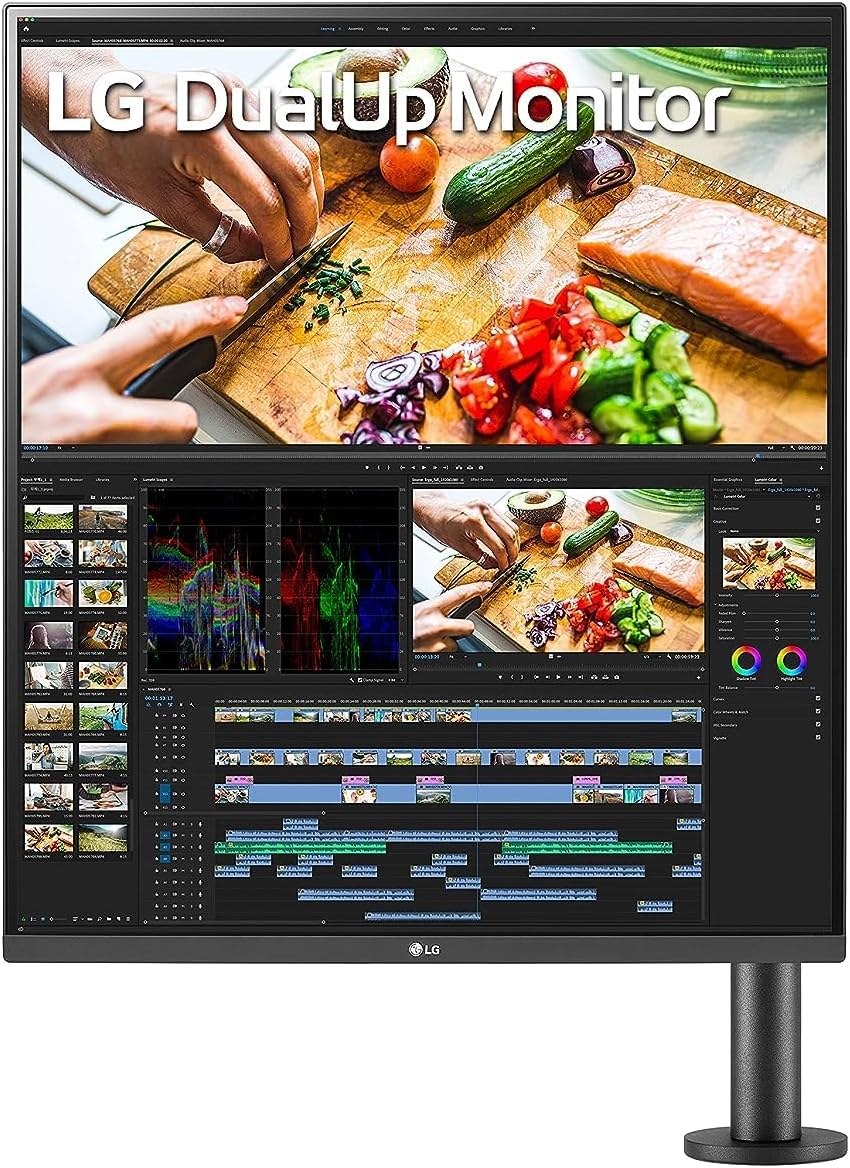
The LG DualUp 28MQ780-B is the only monitor in our guide with a 16:18 aspect ratio — a near-square format designed to replace two stacked monitors in a single panel. Backed by a Nano IPS panel covering 98% DCI-P3, SDQHD resolution, and 90W USB-C single-cable connectivity, it occupies a genuinely distinct niche. Whether that niche fits your workflow determines whether its A-tier score translates into the right purchase for you.
How We Scored It
Category Deep-Dives
Image Quality
8.5 / 10 30% weightingThe 16:18 aspect ratio is the DualUp’s defining characteristic and the lens through which every other specification should be interpreted. The nearly square format is purpose-built to replace two stacked monitors — the vertical real estate fundamentally changes how documents, code files, legal briefs, and spreadsheets are displayed versus standard widescreen. Users accustomed to scrolling long documents on a conventional monitor will find the DualUp’s canvas genuinely transformative; SDQHD at 28 inches provides the equivalent of two 27-inch 1440p panels stacked end-to-end, without the center bezel gap that breaks focus in traditional dual-monitor setups.
The Nano IPS panel delivers 98% DCI-P3 coverage — accurate and vibrant color without factory calibration required for most workflows. Independent measurements place Delta E below 1.0 from the factory, which is competitive with dedicated prosumer displays. For content work, photography, and demanding color tasks, the DualUp’s panel holds its own. The SDQHD resolution of 2560×2880 delivers high pixel density at 28 inches — text rendering is noticeably sharper than standard 1080p or 1440p at equivalent size, with most users finding individual pixels imperceptible at typical desk depth.
HDR400 certification is functional rather than transformative. The 1000 nit peak brightness rating applies to HDR highlights only; the 300 nit typical brightness is adequate for most office environments but not exceptional. True HDR performance — particularly black depth — is better served by IPS Black panels such as those in the Dell U4025QW or U3225QE. The DualUp’s image quality case rests on its Nano IPS color accuracy and high-density SDQHD resolution, not on HDR.
Bottom line on image quality: Excellent Nano IPS color accuracy and high-density SDQHD resolution in a vertical-format canvas that has no direct equivalent in our guide. The 16:18 format is not for every workflow — but for users whose work benefits from vertical real estate, the DualUp’s panel is a strong match.
Connectivity & Versatility
7.5 / 10 22% weightingThe 90W USB-C single-cable setup is the DualUp’s core connectivity proposition: one cable powers the connected laptop, transmits the display signal, and connects USB peripherals through the downstream hub. For most thin-and-light laptops and MacBooks up to the 14-inch Pro, 90W is sufficient to maintain charge under normal workloads. The convenience of eliminating the laptop charger from the desk equation is real and meaningful for users who prioritize cable simplicity.
The USB-C connection is DisplayPort Alt Mode only — not Thunderbolt certified. This is a meaningful distinction: without Thunderbolt, bandwidth is limited compared to TB4 implementations, and daisy-chaining additional displays is not supported. Users who rely on Thunderbolt-specific features — daisy-chaining, higher bandwidth for external GPUs, or guaranteed performance specifications — will find the DualUp’s USB-C implementation constraining. The downstream hub includes 2× USB-A 3.0 and 1× USB-C, sufficient for standard peripheral connections without a separate hub.
The narrow 16:18 aspect ratio creates real constraints for productivity layouts that assume wide-format content. Side-by-side application arrangements are limited by the DualUp’s physical width — barely wider than a 21.5-inch conventional monitor — meaning workflows that depend on horizontal screen real estate will find this monitor limiting. The DualUp’s connectivity case is best evaluated by users who know their workflow benefits from vertical stacking, with one cable and minimal peripherals.
Bottom line on connectivity: 90W USB-C single-cable simplicity is a genuine strength for compatible laptops. The absence of Thunderbolt certification limits advanced use cases, and the narrow form factor constrains side-by-side layouts. A focused connectivity package for a focused use case.
Value for Money
7.0 / 10 20% weightingThe DualUp commands a genuine premium for its unique form factor — and the value case depends entirely on whether the 16:18 format solves a specific workflow problem for the buyer. For users who need vertical real estate and would otherwise run dual monitors, the DualUp can meaningfully reduce desk complexity: one monitor replaces two, eliminates a second stand or arm, removes a second cable run, and produces a cleaner physical workspace. When evaluated against the total cost and footprint of a dual-monitor setup, the DualUp’s premium becomes more defensible.
For users whose workflows are primarily wide-format — web browsing, video, spreadsheet work in a horizontal layout, or reference-heavy research with side-by-side windows — the DualUp’s narrow physical width is a limitation that the vertical real estate cannot compensate for. In that scenario, the comparison shifts to conventional 27-inch 4K monitors like the Dell U2723QE, which offers more versatile connectivity (Thunderbolt 4, 90W), a mature IPS Black panel, and broader workflow compatibility.
The value score reflects an honest assessment: the DualUp earns its premium for the user it was designed for — document-heavy, code-heavy, or multi-source KVM workflows — and delivers poor value for users outside that profile. Buyers who have identified vertical real estate as a workflow priority will find the DualUp priced fairly for what it uniquely offers.
Bottom line on value: Strong value for users replacing a dual-monitor stack. Average-to-poor value for users with primarily wide-format workflows. The question is not whether the DualUp is expensive — it is whether the 16:18 format solves a problem you actually have.
Ergonomics & Build
8.5 / 10 15% weightingThe ErgoStand is genuinely well-engineered: height, tilt, and pivot adjustment in a cable-managed clamp arm that attaches to the desk edge rather than sitting on a traditional flat base. This design reduces the footprint on the desk surface itself — the DualUp occupies minimal desk depth while the arm keeps cables routed cleanly. The clamp mechanism supports fore-and-aft extension as well, giving users flexibility to position the monitor at the correct depth for their setup. Build quality is consistent with LG’s premium UltraFine and UltraGear lines — minimal chassis flex, well-damped adjustment mechanisms, and an overall feel that matches the product’s price positioning.
The tall narrow form factor requires more desk depth than standard monitors to allow the monitor to be positioned at a comfortable eye level — the panel is taller than a conventional 27-inch display when oriented vertically, and needs to be raised high enough that the center of the screen aligns with the user’s natural eye line. The included Ergo arm makes this straightforward; users who want to mount the DualUp on an aftermarket arm can do so via the standard 100×100mm VESA mount. For its price range, the ErgoStand is one of the better stock stands evaluated in our guide.
Bottom line on ergonomics and build: ErgoStand is the best stock stand in our monitor evaluation — full height, tilt, pivot, and fore-aft adjustment in a compact clamp-mounted arm. Build quality matches LG’s premium tier. The tall narrow format requires attention to vertical positioning but the stand makes achieving it straightforward.
Eye Comfort
8.0 / 10 8% weightingThe DualUp’s Nano IPS panel includes hardware-level flicker-free backlight (DC dimming) and a low blue light filter accessible through the OSD’s Reader Mode. The hardware implementation of blue light reduction — unlike software overlays — maintains color accuracy for work tasks while reducing short-wavelength emission during extended evening sessions. At 300 nits typical brightness, the DualUp is comfortable in most home office environments without requiring aggressive brightness reduction; the minimum brightness floor is low enough for comfortable dim-room use.
The anti-glare coating is effective at diffusing direct reflections without introducing visible grain in high-ambient-light environments. In standard home office lighting conditions — overhead fixtures, windows — the DualUp does not require adjustment to manage reflections. The tall panel format means more of the screen is at eye level (or above) compared to conventional widescreen monitors at similar desk positions, which may require more precise stand adjustment to avoid neck strain from looking up at the top third of the screen.
Bottom line on eye comfort: Solid eye comfort package: hardware flicker-free backlight, effective blue light filter, and anti-glare coating that performs well in typical office environments. The tall format requires proper stand height calibration for all-day comfort.
Refresh Rate & Responsiveness
6.0 / 10 5% weightingAt 60Hz, the DualUp is a productivity-only panel — there is no gaming use case, no adaptive sync, and no meaningful fast-motion capability. This is by design: the SDQHD resolution, 16:18 format, and Nano IPS panel technology are all optimized for document work, coding, and multi-source productivity, not display performance. Input lag is acceptable for office work; cursor tracking and window movement are smooth enough that 60Hz does not feel limiting in the workflows the DualUp is designed for.
For users considering the DualUp specifically as a productivity monitor, 60Hz is not a meaningful drawback — the refresh rate score reflects the category weighting and benchmark, not a practical complaint about the monitor’s suitability for its intended purpose. The 5% weighting assigned to refresh rate in our scoring methodology reflects exactly this hierarchy: for home office productivity, image quality and connectivity matter substantially more than frame rate.
Bottom line on refresh rate: 60Hz is a known limitation for users who need smooth motion or gaming capability. For the document-heavy, code-heavy workflows the DualUp targets, 60Hz is entirely sufficient and the 6.0 score reflects the category benchmark rather than a practical complaint.
About the Manufacturer
Elec
LG Electronics is a global consumer electronics and display manufacturer headquartered in Seoul, South Korea, and a subsidiary of LG Corp. LG Display — a publicly listed affiliate — manufactures IPS and OLED panels used in monitors across the industry, including panels sold under competing brands. This vertical integration gives LG’s monitor division meaningful insight into panel characteristics and production-level control over display quality that differentiates it from brands that source panels externally.
LG’s UltraFine and commercial monitor divisions have developed significant expertise in productivity-focused display design. The DualUp 28MQ780-B represents LG’s most distinctive form factor innovation in recent years — a deliberate departure from the industry convention of wider, shorter panels, designed explicitly for users who want to reduce multi-monitor desk sprawl without sacrificing vertical screen real estate. The ErgoStand arm, included standard with the DualUp, reflects LG’s commitment to ergonomic adjustability as a product differentiator rather than an upsell. Warranty coverage is 3 years limited.