4 Professional
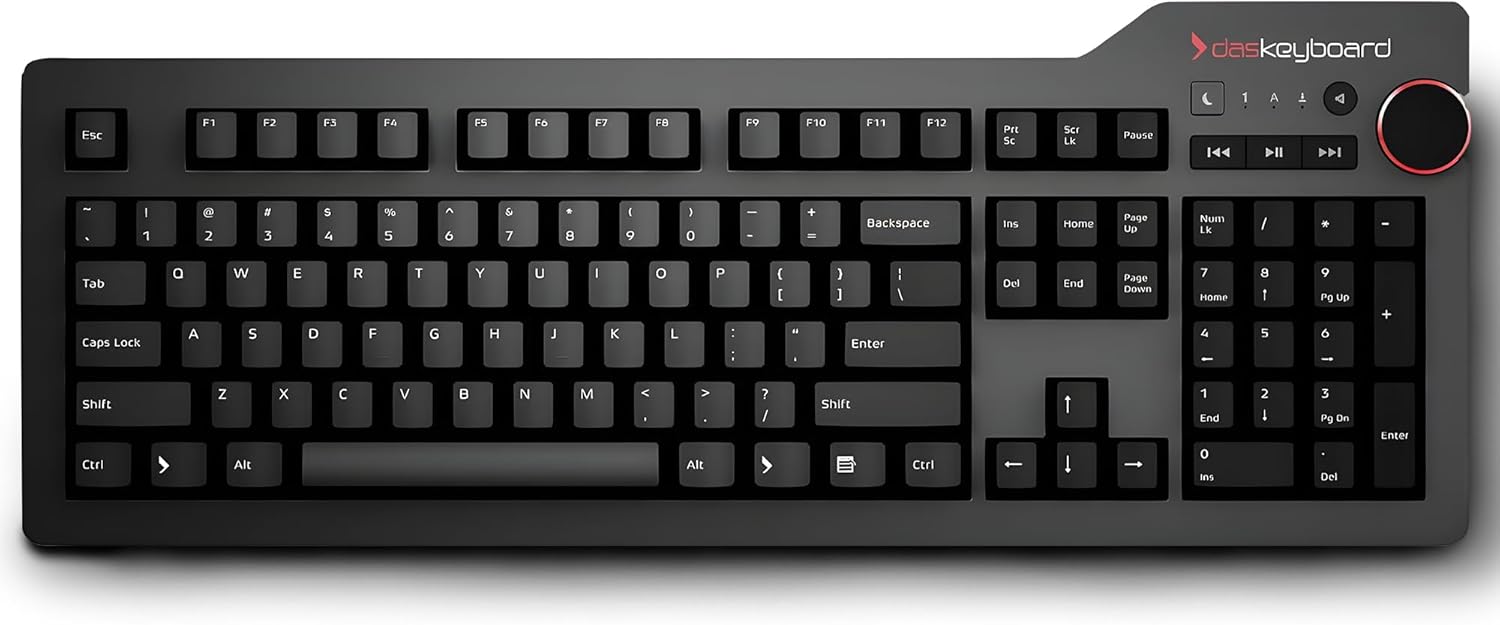
The Das Keyboard 4 Professional is a full-size wired mechanical keyboard with an anodized aluminum top panel, Cherry MX switches, a built-in 2-port USB 3.0 hub, and an oversized volume knob — a specification that was genuinely premium when this keyboard launched in 2014. The mechanical keyboard market has changed profoundly since then. At its premium price, this keyboard competes against options that include hot-swap PCBs, QMK/VIA firmware, gasket mount construction, double-shot PBT keycaps, and wireless connectivity — none of which the Das Keyboard 4 Professional offers. The score reflects a keyboard that remains physically well-built but has not kept pace with the feature evolution of the market it helped establish.
How We Scored It
Category Deep-Dives
Typing Feel & Comfort
5.5 / 10 30% weightingThe Das Keyboard 4 Professional uses Cherry MX Brown switches — a tactile, non-clicky mechanical switch with a 45g actuation force, a soft tactile bump at approximately 2.0mm of travel, and a 4.0mm total travel depth. Cherry MX Brown is one of the most broadly deployed switch variants in the market, favored by users who want some tactile feedback without the audible click of Cherry MX Blue. In terms of raw switch quality, Cherry MX remains a consistent and reliable choice: the switches are rated at 100 million keystrokes, manufactured to tight tolerances, and well-understood by the keyboard community. The typing experience on MX Brown is characteristically “gentle” — the tactile bump is subtle enough that some users find it indistinguishable from a linear switch, and the switch is neither the most satisfying tactile option (Boba U4, Holy Panda) nor the smoothest linear option in the current market. It is a competent, mid-tier switch choice that has been the default recommendation for office use for a decade.
The ABS laser-etched keycaps are the most consequential material compromise at this price point. ABS plastic is softer and lighter than PBT, producing a slightly hollow bottom-out sound and a key surface that develops shine — a polished, greasy appearance from fingertip contact — after extended use. The laser-etching process marks legends by burning through a top coating layer, which means the legends themselves are surface treatments rather than physical structures. Laser-etched legends wear more readily than double-shot or dye-sublimated alternatives. At a budget price, ABS laser-etched keycaps are accepted as a constraint. At this premium price, they represent a specification failure that undermines the premium price claim — the far cheaper Keychron V1 includes double-shot PBT keycaps, and the Q1 Pro at approximately the same price as the Das Keyboard 4 Professional includes double-shot PBT as a matter of course.
The plate-mount construction produces the rigid, high-pitched acoustic profile characteristic of standard plate-mount mechanical keyboards — a “clacky” character that is physically different from the gasket-mount “thock” that has become the reference sound for premium mechanical keyboards. The aluminum top plate is stiff by design, which provides a consistent keystroke feel across the board but with no acoustic damping between the switch and the case. The result is a typing experience that is mechanically precise and consistent, but without the softened acoustic character of gasket-mount keyboards at comparable or lower prices.
Bottom line on typing feel: Cherry MX Brown switches deliver reliable, proven tactile feedback, and the overall typing experience is consistent and functional — but ABS laser-etched keycaps at this premium price are indefensible by current standards, and the plate-mount construction produces an acoustic profile that keyboards with gasket mounts at a fraction of the price (C3 Pro) have surpassed. The 5.5 score reflects good switch hardware underneath a keycap and mounting specification that should not exist at this price.
Build Quality
7.0 / 10 20% weightingThe Das Keyboard 4 Professional’s anodized aluminum top panel is the product’s most genuine premium material. The aluminum surface is rigid, scratch-resistant, and provides a cool, high-quality tactile desk presence that plastic-top keyboards cannot replicate. The keyboard weighs approximately 1.3kg — significantly heavier than any other keyboard in this evaluation — which gives it a desk-anchor solidity during fast typing that lighter keyboards cannot match. The aluminum top does not flex under any normal typing pressure, and the construction has proven durable over the keyboard’s long production run: units from the original production run are still in daily use with no structural degradation. For buyers who prioritize physical robustness above all other specifications, the Das Keyboard 4 Professional’s construction is defensible even in the current market.
The soldered PCB means switches cannot be replaced without soldering skill and equipment — a limitation that has become a dealbreaker for an increasing share of mechanical keyboard buyers who expect hot-swap capability at the premium price tier. In 2014, soldered keyboards were the norm and hot-swap was an enthusiast-only feature. In the current market, 5-pin hot-swap PCBs are standard from the budget tier (Keychron C3 Pro, Keychron V1) up through the premium tier. The Das Keyboard 4 Professional’s soldered construction means that a failed switch requires either soldering rework or full board replacement — an operational cost that is invisible during normal use but becomes significant the moment a switch fails or the user wants to change switch type.
The built-in 2-port USB 3.0 hub is the build quality section’s positive differentiator — a physical feature that no other keyboard in this guide provides and that has practical daily value for users who need to plug USB devices into the keyboard rather than reaching behind the computer. At the time of launch, on-board USB hubs were a meaningful premium feature. They remain useful today, though the prevalence of docking stations and USB-C monitors has reduced the frequency with which users need a keyboard-mounted hub as their primary expansion point.
Bottom line on build quality: The aluminum top panel and overall physical construction are genuinely premium — the 7.0 score here is honest. The Das Keyboard 4 Professional feels like an expensive keyboard because it is built like one. The soldered PCB is the build quality’s only significant structural limitation, and even that is a constraint that was accepted practice at the time of design. Where the keyboard fails is not in its build but in the price it commands for that build relative to what the current market delivers.
Connectivity & Features
3.0 / 10 20% weightingThe Das Keyboard 4 Professional connects via a fixed USB-A cable — wired only, with no Bluetooth, no 2.4GHz wireless, and no USB-C. The USB-A connector on the cable is not detachable on the standard 4 Professional, which means replacing a damaged cable requires either purchasing an aftermarket solution or returning the keyboard for service. In a keyboard guide where triple-mode wireless (Bluetooth + 2.4GHz + wired USB-C) is available on budget boards (Keychron B1 Pro) and Bluetooth 5.1 multi-device pairing is available on the NuPhy Air75 V3 for less, while this premium keyboard has a fixed wired-only USB-A connection is an anachronistic specification that carries a meaningful practical cost for buyers who use multiple devices.
The keyboard’s N-key rollover (NKRO) over USB ensures that every simultaneous keystroke is registered regardless of how many keys are pressed — a specification relevant to gaming and very fast typists who want to ensure no keystroke is dropped in complex chord inputs. NKRO is also present on the Keychron Q1 Pro, K8 Pro, and several other keyboards in this guide, so it is not a differentiating feature in the current evaluation context. The full-size layout with numpad occupies significant desk width — approximately 440mm — which is the widest footprint in this guide. For users who require dedicated numpad access for accounting, data entry, or spreadsheet work, the numpad is a genuine productivity asset that no other keyboard in this evaluation provides. For buyers who do not use the numpad regularly, the additional width consumes desk space without functional return.
The oversized aluminum volume knob and dedicated media controls (mute, previous, play/pause, next) are physical controls that operate independently of the operating system and function without software installation. The volume knob in particular — a smooth, stepped rotary knob positioned at the top-right corner of the keyboard — is the Das Keyboard 4 Professional’s most beloved hardware feature and the detail most frequently cited in long-term owner reviews as irreplaceable. Physical volume controls on a keyboard that respond instantly without OS mediation are a quality-of-life feature that buyers who experience it consistently report missing when switching to keyboards without it.
Bottom line on connectivity: Wired-only via fixed USB-A in a market where budget keyboards offer triple-mode wireless — the connectivity specification scores poorly on objective capability grounds. The 3.0 reflects this, with partial credit for the NKRO capability, the USB 3.0 hub passthrough, and the media controls. The volume knob is the one genuinely beloved feature that no other keyboard in this guide can match in the same form factor.
Acoustics & Workspace Fit
5.5 / 10 15% weightingThe Das Keyboard 4 Professional with Cherry MX Brown switches produces a standard plate-mount mechanical keyboard acoustic profile: a firm, pronounced clack on each keystroke with a resonant bottom-out that varies somewhat based on the key position and keycap. Measured at approximately 58–65 dB SPL under normal typing conditions, the Das Keyboard 4 Professional is audible at distance in a quiet room and produces perceptible keystroke noise on directional microphones during video calls. It is not the loudest keyboard in this guide — Cherry MX Blue clicky variants, present on some competing keyboards, are noticeably louder — but it is not a quiet keyboard, and it is not appropriate for open-plan office use or video call typing without headset microphone management.
The full-size layout is the largest footprint in this evaluation at approximately 440mm × 165mm, and its 1.3kg weight means it is not practical for travel or shared desk use cases. The keyboard functions as a dedicated desktop peripheral: it stays in place, connects via cable, and does not move. For single-desk, fixed-workstation setups, the full-size layout’s footprint is simply the allocated keyboard space. For users who share desks, travel frequently, or work from varied locations, the Das Keyboard 4 Professional’s size and weight make it an impractical choice.
There is no acoustic damping included — no case foam, no gasket layer, no PE foam between the PCB and the case. The aluminum top panel, while physically premium, actually amplifies the acoustic brightness of Cherry MX bottom-out by providing a hard, reflective surface that resonates at the frequencies produced by switch actuation. Community modifications — adding switch films, lubricating switches, adding PE foam — are available and will meaningfully improve the Das Keyboard 4 Professional’s acoustic profile, but they require disassembly of a soldered keyboard that was not designed for user modification access. Compared to keyboards that include acoustic foam (Keychron C3 Pro) or gasket mounts (Keychron V1 equivalent tiers) for far less, the Das Keyboard 4 Professional’s acoustic refinement out of box trails expectations for the price.
Bottom line on acoustics: Standard plate-mount mechanical keyboard acoustics with a full-size footprint that makes this a committed desktop peripheral rather than a flexible one. The 5.5 score reflects genuine mechanical keyboard noise levels — louder than scissor-switch alternatives, roughly comparable to other plate-mount mechanicals, and without the acoustic refinement improvements available on gasket-mount keyboards at significantly lower prices.
Value
2.0 / 10 10% weightingAt its premium price, the Das Keyboard 4 Professional is the most expensive keyboard in this evaluation. The Keychron Q1 Pro — which includes gasket mount construction, full aluminum case, hot-swap 5-pin PCB, QMK/VIA firmware, Bluetooth 5.1 wireless with three-device pairing, and double-shot PBT keycaps — is available at approximately the same price. The Das Keyboard 4 Professional offers none of those features. The Keychron V1 — which includes hot-swap 5-pin PCB, QMK/VIA firmware, and double-shot PBT keycaps — is available for less than half the price of the Das Keyboard 4 Professional, and the Keychron C3 Pro adds gasket mount to that feature set for even less. The mechanical keyboard market has moved comprehensively past the specification set the Das Keyboard 4 Professional represents, and the price has not moved to reflect this.
The value case for the Das Keyboard 4 Professional rests on three specific features: the aluminum top panel, the built-in USB 3.0 hub, and the volume knob. No other keyboard in this evaluation includes all three simultaneously. For buyers who specifically require all three — an aluminum-panel keyboard with onboard USB hub and a physical volume knob — the Das Keyboard 4 Professional is not a well-priced option but it is the available option. For buyers who can trade one or more of those features for lower price or better firmware and serviceability, numerous alternatives provide better value at every price tier below it.
The long-term cost picture also unfavorably distinguishes the Das Keyboard 4 Professional. The soldered PCB means a failed switch requires soldering or board replacement. The ABS laser-etched keycaps will develop shine and potentially worn legends over a multi-year ownership period. The proprietary firmware means the keyboard’s functional life is determined by Das Keyboard’s commercial support decisions rather than an independent open-source community. At this premium price, buyers reasonably expect a keyboard designed to last indefinitely; the Das Keyboard 4 Professional’s serviceability and keycap durability constraints undermine that expectation.
Bottom line on value: The lowest value score in this evaluation. At this premium price in the current mechanical keyboard market, the absence of hot-swap, QMK/VIA, wireless, gasket mount, and PBT keycaps is not a premium specification — it is a specification deficit. The 2.0 score reflects the stark mismatch between price and feature delivery relative to what the market provides at this and lower price points.
Customizability
2.5 / 10 5% weightingThe Das Keyboard 4 Professional has no QMK/VIA firmware support and no browser-based programming interface. Das Keyboard offers proprietary software for macOS and Windows that provides basic key remapping for a limited subset of keys and macro recording for simple keystroke sequences, but the depth of customization available falls significantly short of what QMK/VIA provides on far cheaper keyboards (Keychron C3 Pro, Keychron V1). There is no multi-layer configuration, no tap-dance functionality, no per-key LED programming, and no Linux software support. The keyboard cannot be programmed via USB without installing Das Keyboard’s proprietary application.
The soldered PCB eliminates switch ecosystem access — switches cannot be changed without desoldering, which requires soldering equipment, skill, and a willingness to work on a sealed keyboard not designed for user access. In contrast, every mechanical keyboard in this guide with a “hot-swap” designation allows complete switch replacement in minutes without tools. The keycap ecosystem is technically accessible — standard MX keycap sets are compatible with the full-size 104-key layout — but ABS laser-etched keycaps that fade are a reason to replace keycaps rather than a positive customizability feature. The keyboard accepts aftermarket PBT keycap sets as a meaningful upgrade path, but this is a correction to a specification gap rather than a feature.
The volume knob is not programmable — it controls system volume exclusively and cannot be reassigned to scrolling, zoom, or application-specific functions as programmable knobs can on keyboards with QMK-based rotary encoder support. The media keys are fixed-function. The entire keyboard’s layout is effectively static, with only superficial remapping available through proprietary software. For a keyboard at this price, this represents a customizability ceiling that budget keyboards have comprehensively surpassed.
Bottom line on customizability: The lowest customizability score in this evaluation alongside the lowest-value score — a consistent picture of a keyboard whose premium price is supported by build quality and brand legacy rather than feature delivery. No QMK/VIA, no hot-swap, no open-source firmware, and no Linux support. The 2.5 reflects the near-complete absence of customizability infrastructure that the rest of the mechanical keyboard market now treats as baseline.
About the Manufacturer
Key.
Das Keyboard was founded in 2005 by Daniel Guermeur with the original Das Keyboard — a blank-keycap mechanical keyboard designed for touch typists and programmers who believed that removing key labels would force users to internalize proper typing technique. The company built an early following among developers and power users at a time when mechanical keyboards were largely out of fashion and the consumer keyboard market was dominated by rubber-dome membranes.
The Das Keyboard 4 Professional, launched in 2014, represented the company’s attempt to create a definitive professional mechanical keyboard — aluminum construction, media controls, USB hub, and Cherry MX switches in a package targeting enterprise and power users willing to pay a premium for a keyboard that would last indefinitely. It succeeded at that goal within the context of its era: the 4 Professional was among the most feature-complete professional keyboards available at launch and remained a credible recommendation for several years afterward.
The mechanical keyboard market’s transformation between 2016 and 2024 — driven by Keychron’s market entry, the democratization of QMK/VIA firmware, the mainstreaming of hot-swap PCBs, and significant price compression across the enthusiast tier — changed the competitive landscape the Das Keyboard 4 Professional occupies. Das Keyboard has released subsequent products (Das Keyboard 6 Professional, Das Keyboard X50Q) that address some of these gaps, but the 4 Professional has remained available at its original price point without specification updates that would reflect the current market. For buyers considering the Das Keyboard brand, the newer product line merits evaluation alongside the 4 Professional rather than treating the 4 Professional as the current representative of what Das Keyboard offers.