14-Port Thunderbolt 3 Dock
The OWC 14-Port Thunderbolt 3 Dock is a premium-built, feature-dense TB3 dock that delivers dual 4K@60Hz native display output, 85W host charging, and an unusually generous 14-port layout in a compact aluminum enclosure. The headline port count is genuine — this dock covers more peripheral types than most competitors, including dual card readers, optical audio, and five USB-A ports. The structural limitations are equally real: the Thunderbolt 3 platform is legacy by 2025–2026 standards, USB-A tops out at 5Gbps with no 10Gbps option, the downstream Thunderbolt port delivers only 5W, and OWC’s pricing historically sits above equivalent-spec alternatives. Compounded by the arrival of Thunderbolt 4 docks that match or exceed this dock’s capabilities at competitive prices, the 14-Port TB3 scores 5.6 out of 10 — a product that served Mac-focused workflows well in its era but is difficult to justify as a new purchase for most buyers today.
How We Scored It
Category Deep-Dives
Connectivity & Bandwidth
4.0 / 10 30% weightingThe OWC 14-Port dock connects via its included Thunderbolt 3 cable, providing 40Gbps of total available bandwidth shared across all connected devices, display outputs, and the downstream TB3 port. That bandwidth ceiling is the same figure as Thunderbolt 4 — but in the 2025–2026 context, TB3 represents the legacy tier of the Thunderbolt ecosystem, and the OWC’s specific implementation amplifies several platform constraints rather than mitigating them.
The five USB-A ports all operate at USB 3.1 Gen 1 (5Gbps) — not a single USB-A port on this dock reaches the 10Gbps that mid-range and premium Thunderbolt 4 docks now deliver as standard. For keyboard, mouse, and webcam use, this ceiling is invisible. For users copying files from an external USB-A drive, the hard stop at 5Gbps limits practical throughput to roughly half what a 10Gbps port achieves in the same workflow. The CalDigit TS3 Plus — the other TB3 dock in our guide — has the same USB-A speed ceiling, but compensates with better downstream port power and a more refined overall implementation.
The downstream Thunderbolt 3 port is a particular weak point. Where the TS3 Plus provides 15W to a downstream TB3 device — sufficient for device charging, bus-powered accessories, or a daisy-chained peripheral — the OWC’s downstream port is limited to 5W. That 5W budget covers a daisy-chained TB3 display but is inadequate for charging a phone, powering a bus-powered storage device under load, or delivering meaningful current to most downstream TB3 peripherals. The 40Gbps bandwidth is available, but the power constraint makes the port functionally marginal for most downstream use cases outside of display daisy-chaining.
The dock requires a Thunderbolt 3 or Thunderbolt 4 host — USB-C Alt Mode hosts, AMD-based laptops without TB3 certification, and any laptop with a non-Thunderbolt USB-C port are incompatible. Gigabit Ethernet (1GbE) is included; no 2.5GbE option exists, which is standard in this product category but increasingly limiting as multi-gigabit home networks become more common.
Bottom line on connectivity: Thunderbolt 3 host at 40Gbps with USB-A capped at 5Gbps and a near-ornamental 5W downstream TB3 port. The connectivity package functions but delivers less practical throughput than the TS3 Plus at a higher price, and is significantly outclassed by current TB4 alternatives. The 4.0 score reflects a platform and implementation combination that has fallen meaningfully behind current standards for the asking price.
Display Capability
6.0 / 10 25% weightingThe OWC 14-Port dock provides dedicated DisplayPort 1.2 and HDMI 2.0 outputs, enabling native dual-display operation without DisplayLink drivers or screen recording permissions. Running two 4K monitors at 60Hz simultaneously is fully supported — a practical and clean configuration for the standard home office dual-monitor setup.
The display architecture scores below the CalDigit TS3 Plus (7.0) on two dimensions. First, DisplayPort 1.2 limits the maximum output to 4K@60Hz at standard color depth — the TS3 Plus’s DP1.2 output can drive a single 5K display via daisy-chain protocols, an option the OWC’s implementation does not replicate in the same manner. Second, the HDMI 2.0 output caps at 4K@60Hz, which is adequate for current mainstream monitors but leaves no headroom for higher-refresh-rate panels or 8K displays. For users with standard 4K@60Hz monitors in a two-display configuration — by far the most common home office setup — neither limitation is encountered in daily use.
Apple silicon compatibility follows the standard Thunderbolt caveat. MacBook Air and entry-level MacBook Pro models with M1, M2, or M3 base chips natively support only one extended display, regardless of dock type. The OWC’s two display outputs cannot change this hardware constraint. Users with these Macs who need dual extended displays must use a DisplayLink dock — the OWC 14-Port is not a solution for that configuration, and neither is any Thunderbolt dock.
The display outputs are native and driverless — a genuine advantage over any DisplayLink dock that requires software installation, kernel extension permissions, and incurs CPU overhead for video encoding. For users on TB3-capable Mac or Windows laptops with two standard 4K@60Hz monitors, the OWC delivers a clean, capable display setup.
Bottom line on display: Native dual 4K@60Hz via dedicated DP1.2 + HDMI 2.0 — functional and driverless for the standard dual-monitor home office. DP1.2 limits refresh rate headroom and maximum single-display resolution vs. current standards, keeping the display score at 6.0. For typical 4K@60Hz setups, this dock performs correctly.
Power Delivery
7.0 / 10 20% weightingThe OWC 14-Port dock delivers 85W to the host laptop — adequate for all MacBook Pro 13-inch models and the MacBook Air line, and sufficient to maintain battery under moderate workloads on the 14-inch MacBook Pro. The dock’s 180W total power supply budget provides headroom for the 85W host allocation alongside device charging across the remaining ports. At 85W, this dock covers the full charging profile for the majority of professional ultrabooks; only the most demanding 16-inch laptops under sustained peak load will see battery slowly deplete at this wattage.
The 85W figure sits two watts below the CalDigit TS3 Plus’s 87W — a difference that is academic in any real workflow. The more meaningful gap is the 15W between OWC’s 85W and the 100W ceiling available on top-tier Thunderbolt 4 docks. For MacBook Pro 16-inch users who run sustained compilation, video encoding, or rendering workloads, that headroom matters: at 85W, the battery will discharge slowly under peak CPU and GPU demand rather than maintaining charge. For the substantially larger group of users working in productivity applications, video calls, and browser-based workflows, 85W charges without issue.
Power delivery implementation is stable. OWC’s power architecture prioritizes the host charging allocation before distributing current to downstream ports, meaning standard peripheral connections do not silently degrade the laptop’s charging rate. The included cable delivers the full 85W from dock to host without requiring a separate high-wattage Thunderbolt 3 cable purchase — a notable point since TB3 cable quality affects power delivery and data throughput at the full 40Gbps specification.
Bottom line on power delivery: 85W host charging — practical for MacBook Pro 13-inch and 14-inch at full speed, marginal for sustained heavy workloads on 16-inch models. Stable implementation with no hidden derating under peripheral load. The 7.0 score reflects solid but not class-leading performance, held from higher by the gap vs. 100W TB4 alternatives at comparable price points.
Port Mix & Usability
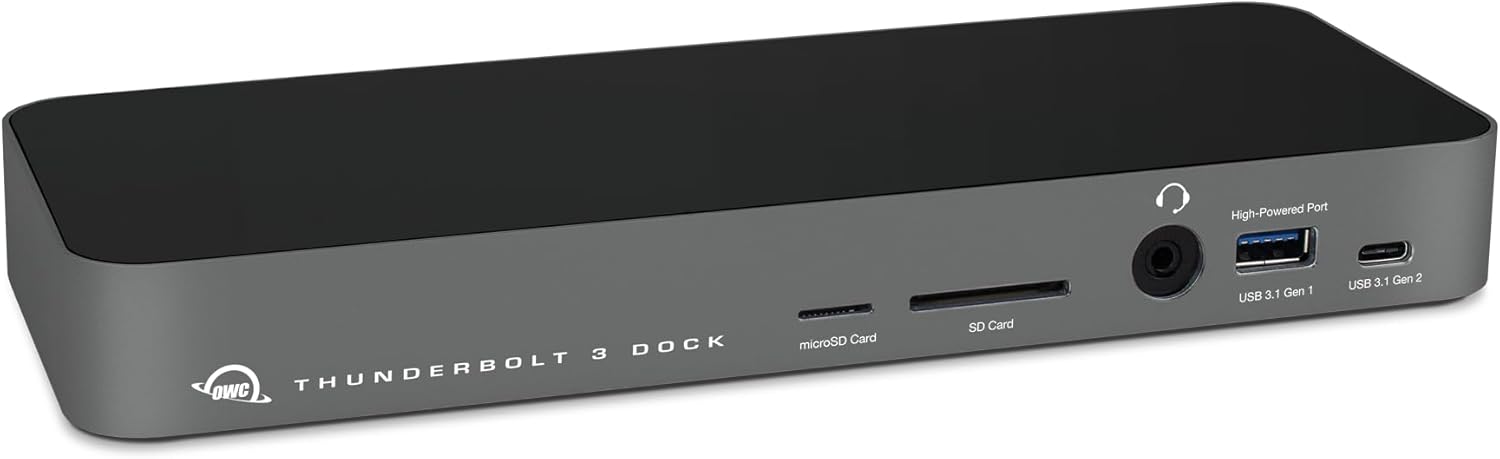
7.0 / 10 15% weightingThe 14-port layout is this dock’s strongest selling point in absolute terms. The composition: one Thunderbolt 3 host port, one Thunderbolt 3 downstream port, one DisplayPort 1.2, one HDMI 2.0, five USB-A 3.1 Gen 1 ports, one USB-C 3.1 Gen 2 (10Gbps) data port, one full-size SD card reader, one microSD reader, one 3.5mm audio jack, one optical (S/PDIF) audio output, and one Gigabit Ethernet port. Front-panel placement of two USB-A ports and both card reader slots provides accessible connectivity for frequently-swapped peripherals without reaching behind the dock.
The dual card reader configuration — full-size SD and microSD as separate, simultaneous slots — is genuinely useful for photographers and videographers who use both formats. OWC’s SD implementation supports UHS-II transfer speeds (up to 312MB/s), which is meaningful for users with fast SD cards from current cameras and drones. The microSD slot runs at UHS-I speeds, which is standard for that format. Having both slots available simultaneously without swapping is a workflow convenience that docks with single-slot or non-existent card readers cannot match.
The optical (S/PDIF) audio output is an anachronism in 2025–2026. Consumer home office setups almost universally use USB or Bluetooth audio, not digital optical connections. The port adds to the headline count without adding practical value for the overwhelming majority of users. Its presence reflects the dock’s original design targeting Mac Pro users in professional audio environments — a context that does not apply to most home office buyers.
Five USB-A ports at 5Gbps is a quantity-over-quality arrangement. Connecting multiple USB-A peripherals simultaneously is convenient, but all five share the bandwidth pool at 5Gbps maximum, and no individual port can reach 10Gbps for users with modern external SSDs that could benefit from higher throughput.
Bottom line on port mix: A genuinely comprehensive physical port set with dual card readers (UHS-II SD + microSD), five USB-A ports, and dedicated audio outputs that cover most home office peripheral needs without additional adapters. USB-A limited to 5Gbps and the presence of an optical audio port that most users will never use are honest limitations. Port composition and front-panel accessibility are genuine strengths. Score: 7.0.
Value
3.0 / 10 7% weightingValue is where the OWC 14-Port Thunderbolt 3 Dock scores most poorly, and the reason is structural rather than incidental. OWC has historically positioned its products at a premium above equivalent-spec competitors, and the 14-Port TB3 Dock’s pricing reflects this approach. In 2025–2026, that premium is applied to Thunderbolt 3 hardware that competes directly against Thunderbolt 4 docks offering 10Gbps USB-A, 2.5GbE, 96–100W host charging, USB4 host compatibility, and robust downstream port power — often at lower or comparable prices.
For a buyer evaluating the OWC 14-Port against alternatives in this guide: the CalDigit TS3 Plus (ranked #15, score 6.8) is also a TB3 dock but delivers a better-implemented connectivity package with 87W PD, 15W downstream TB3, UHS-II SD, and CalDigit’s firmware support track record, typically at a lower price. Moving to Thunderbolt 4, the Kensington SD5700T (ranked #3, score 8.6), Plugable TBT4-UD5 (ranked #4, score 8.4), and OWC’s own current-generation 11-Port TB4 Dock (ranked #5, score 8.1) each deliver materially better specifications at prices that make the 14-Port TB3’s value case very difficult to justify.
The honest buyer profile for this dock in 2025 is narrow: a user with a 2017–2019 MacBook Pro running Thunderbolt 3, who needs the specific port count of 14 and the dual UHS-II SD + microSD reader combination, and who cannot or will not purchase a Thunderbolt 4 dock. Outside that profile, there is no reasonable value argument for the 14-Port TB3 over its contemporaries.
OWC offers a two-year warranty on the dock, which is the category average. The company’s Mac-focused support documentation and warranty service are well-regarded, and firmware maintenance for existing products is part of OWC’s established practice.
Bottom line on value: Premium OWC pricing applied to a Thunderbolt 3 dock in a market where Thunderbolt 4 alternatives deliver superior specifications at competitive prices. The 3.0 score reflects the significant gap between what this dock costs and what buyers can purchase for the same or less money today. This is not a comment on the hardware quality, which is solid — it is a reflection of the market that has grown up around it.
Build & Design
8.0 / 10 3% weightingThe OWC 14-Port dock uses an aluminum enclosure — compact, quiet, and solidly constructed. Passive cooling eliminates fan noise entirely, and the aluminum chassis dissipates heat effectively enough to remain cool under sustained load. Port cutouts are clean and precisely spaced; connections feel firm without excessive insertion resistance. The dock can be positioned vertically or horizontally without mounting hardware, adapting to different desk and shelf configurations.
A Thunderbolt 3 host cable is included in the box — a thoughtful addition that the TS3 Plus notably does not provide. Since Thunderbolt 3 cable quality directly affects power delivery reliability and data throughput at the full 40Gbps specification, OWC’s decision to bundle a certified cable eliminates a common first-setup friction point. The included cable is rated for the full 40Gbps and 100W power delivery standard.
Front-panel port placement is well-considered. Two USB-A ports and both card reader slots are front-facing for easy access to frequently swapped peripherals; display outputs, Ethernet, the host Thunderbolt port, and the bulk of the USB-A ports are rear-facing, supporting clean cable management for permanent connections. An LED indicator provides at-a-glance confirmation that the host connection is active.
As with all high-wattage docks, the external power adapter is a substantial brick. Delivering 85W to the host while powering 14 ports requires a large power supply, and the physical adapter requires behind-desk management that compact bus-powered hubs do not. This is an inherent constraint of the category rather than an OWC-specific failure, but it is worth noting for buyers who want a clean desk setup.
Bottom line on build: Solid aluminum construction, passively cooled, well-organized port layout, and an included Thunderbolt 3 host cable make the build the dock’s strongest category alongside port mix. OWC’s manufacturing quality is above average and the design has aged well mechanically. The 8.0 score reflects genuine hardware quality held from higher by the large power adapter and the limitations common to TB3-era docks.
About the Manufacturer
OWC (Other World Computing) was founded in 1988 in Woodstock, Illinois, originally selling pre-owned Apple hardware and Mac upgrades. Over three decades, the company grew into a significant provider of Mac-compatible storage, RAM, SSDs, and connectivity accessories — becoming a trusted source for Mac users seeking to extend the useful life of Apple hardware beyond what Apple’s own upgrade paths offered. OWC products are sold through the company’s website, B&H Photo, Amazon, and Mac-focused retailers.
OWC’s Thunderbolt peripheral line developed from this Mac-focused expertise. The 14-Port Thunderbolt 3 Dock was positioned as a comprehensive Mac workstation hub, targeting creative professionals who needed the broadest possible peripheral coverage in a single-cable solution. The company’s documentation for Mac-specific configurations is thorough, and OWC maintains firmware update support for its Thunderbolt products consistent with its policy of supporting hardware for several years post-launch.
In the current product landscape, OWC’s flagship docking station is the Thunderbolt 4 Dock (11-port, ranked #5 in our guide with an 8.1 score). For buyers with Thunderbolt 4 or USB4 capable laptops, OWC’s own current lineup represents the better investment — the TB4 dock delivers superior USB-A speeds, more practical downstream port power, and forward compatibility at a price that the legacy 14-Port TB3 Dock cannot match in value terms. OWC is not affiliated with Apple Inc.