Link 2C AI-Tracking Webcam
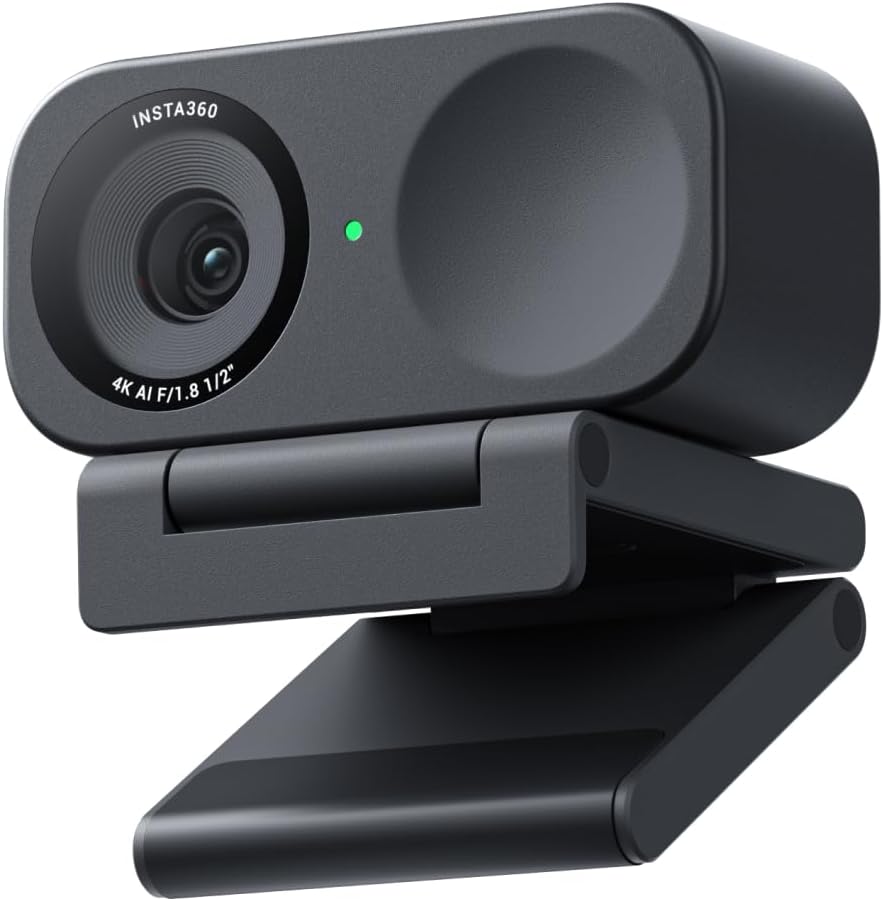
The Insta360 Link 2C is the only webcam in our guide with a motorized gimbal head — a hardware distinction that enables genuine 3D AI tracking rather than the digital crop-and-pan approach used by software-based tracking solutions. It captures 4K video, recognizes gestures, flips down into Desk View for whiteboard-style presentations, and keeps a moving subject centered in frame without any manual adjustment. For users who present from a standing desk, move around during video calls, or frequently share physical work at a desk camera, it offers a capability no fixed webcam can replicate.
How We Scored It
Category Deep-Dives
Image Quality
8.0 / 10 30% weightingThe Link 2C captures video via a 1/2″ CMOS sensor — a meaningful sensor size for a webcam, sitting between the larger sensors in the Razer Kiyo Pro Ultra and the smaller sensors in budget alternatives. At 4K@30fps, the image is sharp and detailed with good dynamic range in standard office lighting. The on-device HDR mode handles mixed lighting environments — a window behind the subject alongside overhead office lighting, for example — noticeably better than webcams without HDR processing. Auto-exposure and white balance are handled by Insta360’s AI image processing pipeline, which tends toward accurate neutral tones rather than the over-sharpened, high-contrast look that some webcam manufacturers bake in by default.
The variable field of view is a practical advantage. Standard mode at 79° frames a typical desk setup naturally. Ultra-wide at 150° captures a full room or a standing presenter with space to move. The AI tracking system uses the ultra-wide view as its working canvas, then crops and zooms to keep the subject centered — meaning the 4K sensor resolution is doing real work when tracking is active, providing pixel headroom for the digital zoom without degrading apparent sharpness. In 1080p@60fps mode, frame rate smoothness is notably improved over the 30fps ceiling, which is useful for presentations or content where motion appears more natural at higher frame rates.
Compared to the Logitech MX Brio 705 and Razer Kiyo Pro Ultra at the top of our guide, the Link 2C’s image processing is competent but not class-leading. In challenging low-light conditions, it produces acceptable video without the grain-suppression quality of the Kiyo Pro Ultra’s larger sensor. The Link 2C’s image quality is strong for normal office lighting — it becomes differentiated specifically in its tracking and framing capabilities, not in outright low-light performance or color science.
Bottom line on image quality: Above-average sensor with genuine 4K output, effective HDR, and flexible FOV — better than most webcams at this rank. Not the sharpest low-light performer in the guide, but the variable framing capability adds functional image quality advantages that static-sensor webcams cannot match.
Audio
6.5 / 10 25% weightingThe Link 2C includes dual omnidirectional microphones that capture clear voice audio at close to mid range (up to roughly 1.5–2 meters). The dual-mic array provides modest directional pickup improvement over a single microphone, and Insta360’s software applies noise reduction processing that handles consistent background noise — air conditioning, fan hum — acceptably well. In quiet environments, call participants consistently rate the audio as clear and professional. The weakness emerges in noisier settings: keyboard noise, paper rustling, and irregular background sounds break through the noise reduction more than the beamforming array in a competing webcam like the Logitech MX Brio 705.
The physical gimbal mechanism introduces a consideration specific to the Link 2C: when the motorized head is actively tracking, the servo motors produce a faint mechanical noise — a quiet but audible hum during panning and tilting. In typical office environments with ambient noise this is not picked up by the microphones, but in very quiet recording environments or during screen recordings it can be captured as subtle servo noise in the audio track. Users doing solo content recording in acoustic setups may find this a relevant limitation that the spec sheet does not surface.
For the majority of home office video call use — regular meetings, client calls, remote collaboration — the audio quality is sufficient and better than many competing webcams. The limitation is relative: the beamforming arrays on cameras like the Logitech MX Brio 705 deliver meaningfully cleaner audio capture in the same use cases. Users for whom audio quality is the primary concern should evaluate those alongside the Link 2C before deciding.
Bottom line on audio: Adequate for standard video calls, weaker under demanding conditions. The tracking gimbal can introduce faint servo noise in quiet recording environments. Users who need best-in-class audio pickup should pair the Link 2C with a dedicated USB microphone rather than relying on the built-in mics.
Usability & Features
9.0 / 10 20% weightingThis is where the Link 2C earns its ranking in our guide. The motorized gimbal provides genuine 3D head tracking — physical pan and tilt movement rather than the digital crop-and-zoom that software AI tracking uses on fixed cameras. The practical difference is significant: software tracking degrades effective resolution as it zooms in on the subject, and introduces compression artifacts when tracking motion rapidly. The Link 2C physically moves to keep the subject centered, using the full sensor resolution regardless of subject position. Tracking speed and smoothness are adjustable in the Insta360 Link Controller app — slower tracking feels more cinematic, faster tracking suits active presentations. The range of motion covers approximately ±180° horizontal pan and a wide vertical tilt range, enough to follow a presenter moving from one side of a room to the other or standing up from a seated position at a desk.
Desk View mode is the second genuinely useful feature: the gimbal tilts the camera head downward to frame the desk surface below the monitor, creating a top-down view of physical objects, notebooks, or whiteboard surfaces in the workspace. Toggling between Desk View and face-tracking mode is handled via the Insta360 Link Controller or by a gesture — raising an open palm toward the camera triggers a mode switch. This gesture control extends to other functions: the peace sign gesture activates a countdown for taking a photo, and other configurable gestures trigger recording or zoom changes. For users who frequently switch between presenting their face and showing physical materials, Desk View removes the friction of physically repositioning a separate document camera.
The Insta360 Link Controller software is required to access the AI tracking features and configure tracking speed, framing mode, and gesture controls. The software is well-designed and updated regularly, but it does represent an additional installation step and a background process dependency. The camera functions as a standard UVC webcam without the app installed — basic video output works in any meeting platform — but tracking, gesture control, Desk View, and granular settings require the Link Controller running. Portrait mode, which rotates the output for vertical video platforms, and Person Zoom, which automatically frames two people in the frame, round out a feature set that no other webcam in our guide approaches for breadth.
Bottom line on usability and features: The most feature-rich webcam in our guide by a meaningful margin. Motorized 3D tracking, Desk View, gesture control, Portrait mode, and configurable AI framing are collectively unique — no fixed-sensor webcam offers the same range. The Link Controller software dependency is a minor friction point, not a meaningful limitation.
Value
7.5 / 10 15% weightingThe Link 2C is positioned in the upper tier of the webcam market — above the Logitech Brio 500, roughly equivalent to the Obsbot Meet 2, and below the Elgato Facecam Pro, Razer Kiyo Pro Ultra, and MX Brio 705. Within the AI-tracking webcam category, it competes directly with the Obsbot Meet 2 (ranked #4 in our guide), which uses a similar gimbal-based approach. The Link 2C’s image quality is slightly better, its feature set is broader, and Insta360’s software is more mature — trade-offs that justify the modest price premium over entry-level tracking webcams while keeping it accessible relative to the top of our rankings.
The value proposition is most compelling for users who will actively use the tracking and Desk View features. For users who want the best static image quality or the best audio for the same spend, the Logitech Brio 500 or Elgato Facecam Pro deliver better per-dollar performance in those specific dimensions. The Link 2C’s premium is earned when you use what makes it unique — presenting while standing, teaching online, demonstrating physical products, or running meetings where movement is natural and centering the frame manually is a distraction. For users who sit in one place for every call, its advantages over cheaper options are modest.
Bottom line on value: Fair pricing for the AI tracking category; excellent value for users who need those features, moderate value for those who don’t. Worth the investment specifically for active presenters, teachers, and professionals who move during calls.
Physical Design
8.5 / 10 10% weightingThe Link 2C’s gimbal form factor is compact given what it contains: a motorized pan-tilt head with a full-size 1/2″ sensor, housed in a design smaller than many conventional fixed webcams. The magnetic clip-and-stand mounting system attaches to monitor tops, laptop lids, tripods (via 1/4″-20 thread adapter), or desktop stands cleanly and releases without tools. The magnetic connection is firm enough to hold the camera securely during active tracking movement — when the gimbal is rotating, the camera head needs to resist the torque of the motor, which the magnetic base handles without slipping. The build quality of the gimbal mechanism itself is appropriately solid: the pan-tilt axes move smoothly and without perceptible play, and the motor feedback during tracking is precise rather than jerky.
The “C” designation in the Link 2C name indicates the compact clip variant — a refinement over the original Link that reduced the overall profile while retaining the same sensor and gimbal architecture. The result is a webcam that is noticeably less obtrusive on a monitor top than the original Link, fitting naturally into a dual-monitor setup without blocking secondary screen content. The USB-C cable exits from the base of the unit with a short fixed braid — clean for desk routing, though users with monitor setups that require longer cable runs will need a USB-C extension. The status light ring around the lens is subtle and can be disabled in the Link Controller for users who find it distracting during video calls.
Bottom line on physical design: The gimbal form factor is well-executed — compact, securely mounted, and refined enough to sit on a professional desk without looking like a prototype. The magnetic clip system works reliably, and the overall build quality matches the feature set it delivers.
About the Manufacturer
360
Insta360 was founded in 2015 in Shenzhen, China, initially building consumer and professional 360-degree cameras for action sports, virtual reality content, and immersive journalism. The company established its technical reputation through camera stabilization, spherical stitching algorithms, and AI-powered reframing tools that allowed creators to extract conventional-perspective video from 360-degree footage after the fact — a workflow that required significant on-device processing and robust AI image understanding. These capabilities directly informed the development of the Link line of AI tracking webcams, applying Insta360’s existing expertise in subject tracking, stabilization, and perspective control to a video conferencing context.
The original Insta360 Link launched in 2022 to considerable industry attention, as it was among the first gimbal-based webcams to deliver hardware tracking rather than software-only solutions. The Link 2C represents a second-generation refinement — more compact, more polished in both hardware and software, and benefiting from two years of firmware updates and user feedback integration. Insta360 maintains an active Link Controller software release cadence, adding features and addressing compatibility issues on a regular basis. The company’s consumer camera expertise means their imaging algorithms benefit from a larger base of development than most webcam-only competitors — the AI processing in the Link 2C draws from the same technology stack as Insta360’s flagship action cameras, which are tested at scale across a far wider range of subjects and lighting conditions than any dedicated webcam line.
Insta360 products are sold through Amazon, B&H Photo, Best Buy, and Insta360’s own website. The Link 2C is covered by a standard manufacturer warranty, and Insta360 maintains English-language support resources including documentation, video tutorials, and a community forum.