C920x HD Pro
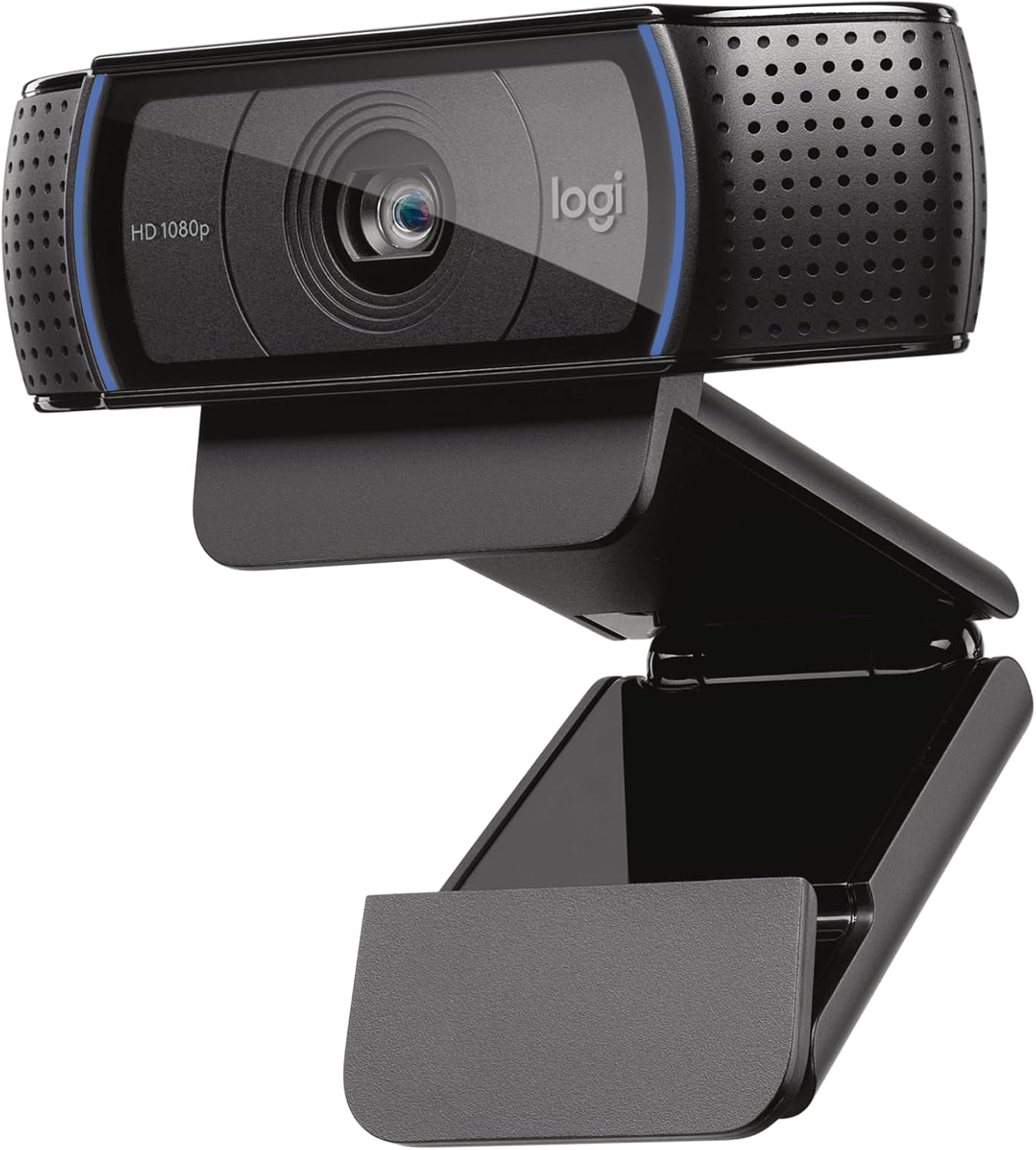
The Logitech C920x HD Pro is a 1080p/30fps plug-and-play webcam with a physical privacy shutter — and its most compelling attribute is not its specs but its track record. The C920 platform has been in continuous deployment in homes, offices, schools, and studios for over a decade, and the C920x adds a built-in privacy cover to an already universally compatible design. For buyers who need driver-free recognition on Windows, macOS, ChromeOS, and Linux, or who are selecting cameras for a managed IT fleet where device unpredictability is a liability, the C920x’s argument is reliability and familiarity rather than leading-edge performance. Where it struggles is value clarity: at its price, the C920x now competes directly against newer entrants like the Anker C200 that offer 2K resolution and an adjustable field of view at similar or lower prices. The C920x’s sensor and processing pipeline have not been materially updated to match these alternatives, which means buyers evaluating on specification per dollar will find stronger options today. It earns its place at #13 for buyers with specific compatibility requirements; for general buyers starting fresh, the value case is harder to make than it once was.
Score Breakdown
Detailed Review
Image Quality
6.0 / 10 30% of scoreThe C920x shoots 1080p at 30fps using a sensor platform that Logitech has refined across many C920-series generations — a foundation that produced genuinely competitive image quality when first introduced, but which now shows its age against newer entrants in the same price bracket. The glass f/2.0 lens is a genuine advantage over plastic-lens competitors and provides decent light collection for a budget camera, translating into adequate performance in typical indoor home office environments under ceiling lights or a monitor bar. In well-lit conditions, the C920x produces natural, accurate-looking footage with reasonable skin tone handling and respectable detail for its resolution class.
Where the sensor’s age becomes apparent is in dynamic range and low-light performance. Positioned near a window with strong backlighting, the C920x tends to blow out highlights or crush shadows rather than balancing the exposure to keep both subject and background visible. This is an area where cameras like the Logitech Brio 500 or the Insta360 Link 2C — both at higher price points — show meaningful improvement through better ISP processing and exposure algorithms. The C920x offers no HDR mode and no automatic light correction. Under desk lamp lighting alone, expect a noisier, slightly muddier image than you’d get from cameras with more modern sensor stacks.
One specification worth contextualizing: the C920x is capped at 30fps at 1080p but can shoot 720p at 60fps. For the vast majority of video call and remote work use cases, 30fps is indistinguishable from higher frame rates and is perfectly adequate. The 60fps at 720p option exists in the spec sheet but is rarely useful in practice: the resolution trade-off offsets any motion clarity benefit for typical office video. The fixed 78° FOV is appropriate for single-person framing at a normal desk setup, though it cannot be adjusted for wider or tighter compositions.
Bottom line: Reliable, natural 1080p/30fps output in good lighting — exactly what the spec sheet promises, without extras. Not class-leading in dynamic range or low-light performance by current standards, but unambiguously functional for the core use case of video calls and remote work.
Audio Performance
6.5 / 10 25% of scoreThe C920x uses dual omni-directional microphones positioned at the sides of the camera body. This configuration provides reasonable pickup coverage at normal conversational distances — roughly one to two feet from the screen — and performs adequately in quiet or low-noise environments. The built-in automatic gain control and background noise reduction are functional but belong to an earlier generation of processing. The microphone won’t embarrass you in a normal Teams or Zoom call, but it is clearly a step below dedicated desk microphones or the newer beamforming arrays found in cameras like the Anker C300.
In practice, audio quality degrades more noticeably than newer designs when the user is positioned further away, typing on a mechanical keyboard, or working in a room with echo. The noise reduction processing can produce an artificial audio character when actively suppressing background sounds — a processing artifact common to older single-chip implementations where aggressiveness is fixed rather than adaptive. For buyers whose home office is reasonably quiet and who sit close to the camera, this is a manageable limitation. For buyers in noisier environments or those who want audio that holds up without a separate dedicated microphone, the C920x is not the right camera.
There is no physical mute button on the camera body. Muting requires software controls through the operating system audio settings or through the video conferencing application itself. This is standard for cameras at this tier but worth noting for buyers who have grown accustomed to the physical mute toggles found on dedicated conference bar units or higher-end cameras like the Obsbot Meet 2.
Bottom line: Dual omni-directional mics with basic noise reduction — adequate for quiet home offices at close range, less impressive under challenging acoustic conditions. A separate USB microphone is worth considering for anyone who spends significant time on audio-sensitive calls.
Usability & Features
7.0 / 10 20% of scoreThe C920x’s defining usability advantage is its absolute plug-and-play reliability. There is no software required. Connecting via USB-A triggers automatic driver recognition on Windows, macOS, ChromeOS, and the vast majority of Linux distributions without any manual installation step. The camera appears immediately as a UVC-compatible video device in any application that accesses video input — video conferencing apps, recording software, streaming platforms, and browser-based tools alike. For buyers deploying cameras across a mixed-device environment or in IT-managed settings where driver installation is restricted, this universality is a meaningful operational advantage that newer or more feature-rich cameras cannot always match.
The privacy shutter is the feature that distinguishes the C920x from the original C920 and earlier variants. It is implemented as a physical sliding panel over the lens — robust, tactile, and genuinely reliable. For anyone who keeps a camera connected to a desktop workstation full-time and wants the assurance of a physical barrier that cannot be circumvented by software, the integrated shutter is a material quality-of-life improvement over camera-cap accessories or software-only privacy controls.
Beyond plug-and-play compatibility and the privacy shutter, the feature set is intentionally minimal: no auto-framing, no digital zoom, no field-of-view adjustment. The optional Logitech G HUB software provides access to image adjustments — brightness, contrast, white balance, sharpness — and allows some presets to be saved. G HUB functions but feels like an afterthought for a camera in this tier. The core experience assumes the camera is used without any accompanying software, and it delivers on that assumption reliably.
Bottom line: Best-in-class compatibility and setup simplicity. The physical privacy shutter is a genuine practical advantage. Feature set is deliberately minimal — a reasonable trade-off for buyers who prioritize broad compatibility and zero-setup friction over advanced tracking or framing controls.
Value for Money
7.0 / 10 15% of scoreThe C920x occupies an increasingly competitive price point. Two years ago, it represented a clear choice at this tier; today, newer entrants like the Anker C200 offer 2K (2560×1440) resolution, a software-adjustable field of view between 65–95°, and an integrated privacy shutter at similar or lower prices. The Anker C300 adds 1080p/60fps, AI auto-framing, and a three-microphone array for a modest premium. Against these alternatives, the C920x’s case rests on brand recognition, proven enterprise compatibility, and the Logitech ecosystem — real advantages in specific purchasing contexts, but not meaningful differentiators for a home office buyer evaluating on raw capability per dollar.
For volume deployments — outfitting a team, a school lab, or a shared office space where IT support has pre-validated the C920x against existing device management infrastructure — the stability advantage has real dollar value that specs alone do not capture. The C920x’s behavior on Windows domain-joined machines, its consistent UVC compliance across OS versions, and its low support ticket rate in enterprise contexts are legitimate reasons to pay a slight premium over an unknown alternative. For this buyer, the value score is higher than what a raw feature comparison suggests.
For a first-time home office buyer without fleet management considerations, the C920x’s value proposition is weaker than its current price implies. The sensor has not been updated to match newer competitors, and the same money today can buy cameras with better image processing, higher resolution, or more thoughtful feature sets. The C920x earns its value score on the strength of its compatibility track record rather than on hardware advantage.
Bottom line: Good value for IT-managed or fleet deployments where compatibility reliability justifies the price. Harder to recommend for individual buyers evaluating fresh — at its price, newer alternatives now offer better specifications for the same or less money.
Physical Design & Build
6.5 / 10 10% of scoreThe C920x uses Logitech’s classic fold-flat design — a plastic body that hinges at the mounting clip, allowing it to fold down flat for portability and hinge upward to perch on a monitor or laptop screen. The clip grip is firm enough to hold on thin laptop displays without excessive wobble, and the fold-flat mechanism provides a stable resting position on a desk when not mounted. Build quality is typical matte plastic: solid enough but with no premium feel. The camera’s footprint and weight are both minimal, which is appropriate for a device that is meant to disappear into the top of a monitor.
The integrated privacy shutter is implemented as a sliding front panel positioned over the lens aperture — satisfyingly tactile, clearly visible when engaged, and mechanically straightforward. It is the most premium-feeling element of the physical design and meaningfully better than the stick-on lens cover accessories that owners of unshuttered cameras sometimes resort to. The bottom of the camera includes a standard tripod thread, allowing use with a desk tripod or camera arm for buyers who prefer not to clip to a monitor.
The USB-A cable exits the bottom of the camera body and is non-detachable at approximately 6 feet (1.8m). This is adequate for most desktop setups but eliminates the option of swapping cable length or upgrading to a braided alternative. More significantly, the USB-A connector requires a port or adapter that some newer Thunderbolt 4–only MacBooks and docking stations do not provide natively. Buyers relying on USB-C–only hubs should factor in a USB-A adapter.
Bottom line: Compact, stable, and practical — the fold-flat clip design and integrated privacy shutter are the physical highlights. The non-detachable USB-A cable limits flexibility for USB-C–centric setups, and the overall build reads as functional rather than premium.
Who Should Buy the Logitech C920x HD Pro
The C920x makes the most sense for two specific buyer situations. First, IT-managed or fleet deployments where device compatibility, predictable driver behavior, and low support overhead matter more than cutting-edge image quality — schools, offices, healthcare settings, or any environment where the camera is selected by an administrator rather than chosen individually by each user. The C920x’s decade-long track record in enterprise environments, its consistent UVC compliance across OS updates, and the broad device management tooling that exists for the C920 platform all support this use case in ways that newer alternatives cannot yet match.
Second, buyers specifically seeking a Logitech-compatible device with physical privacy protection at the entry tier, particularly those who are already invested in the Logitech ecosystem and want consistent experience across their peripherals. For buyers in this situation, the brand consistency and ecosystem familiarity carry real practical value beyond what a pure feature comparison reveals.
For general home office buyers evaluating webcams fresh — without fleet management requirements or ecosystem lock-in — the C920x is harder to prioritize at its current price than it was two or three years ago. If your primary use is video calls in a reasonably well-lit room and you want the most reliable device with zero setup friction, the C920x will never let you down. But if you’re evaluating honestly, spend ten minutes comparing it to the Anker C200 (similar price, 2K resolution, adjustable FOV, integrated shutter) or the Anker C300 (slightly more, 60fps, auto-framing, three mics). Both are strong competitors that outperform the C920x on most measurable dimensions for individual buyers.
Bottom line: An excellent choice for managed IT environments and Logitech ecosystem buyers who need a proven, universally compatible camera with a physical privacy shutter. A harder sell for individual home office buyers who should also evaluate the Anker C200 and C300 at similar price points before committing.
tech
Logitech is one of the largest and longest-established peripheral manufacturers in the world, with a webcam portfolio spanning from entry-level USB cameras to professional-grade 4K units. The C920 platform — of which the C920x is the privacy-shutter variant — has been in continuous production and deployment since 2012, making it one of the most widely installed webcam designs in history. Logitech’s enterprise and education channel presence means the C920x benefits from extensive IT validation, device management integration, and institutional familiarity that newer brands are still building.
The C920x sits at the entry tier of Logitech’s current webcam lineup, below the Brio 500 (HDR, Show Mode, USB-C), the Brio 4K (Ultra HD), and the MX Brio 705 (AI framing, premium optics). For buyers seeking Logitech’s newer processing technology or USB-C connectivity, the Brio 500 is the next step in the product family.